8/7/2025
Reviews
Smart Ways to Get More Reviews [Guide]
Practical, proven ways for any business to get more authentic reviews.

TLDR: To get more Houzz reviews, complete your profile with strong project photos, then ask every happy client within about a week of the final walkthrough using your direct Houzz review link. Because Houzz asks reviewers to create an account, send a short how-to so the request does not die there. Keep the flow steady so your profile looks active, which also helps you qualify for Best of Houzz. The step that protects all of it: run a private check-in before you ask for anything public, so an unhappy client on a long project reaches you first and the delighted ones become your next reviews. Below is how Houzz ranking works, the exact messages that get past the account step, and the private-first system that keeps a six-month build off the one-star list.
Here is what makes Houzz different from Google or Yelp, and why learning how to get more Houzz reviews is worth real effort: the people reading them are about to spend a lot of money. A homeowner on Houzz is not deciding where to grab lunch. They are planning a kitchen gut, a full bath remodel, a design-build addition, or a landscape overhaul that will cost five or six figures and live in their home for decades. They read carefully, and they read the reviews.
That high-stakes mindset changes how they shop. They do not glance at a star average and move on. They scroll your project photos, read the written reviews end to end, and look for one specific signal: did your clients still sound happy at the end of a long, disruptive project? On a two-hour service call, nobody worries about that. On a four-month remodel, it is the whole decision.
So your Houzz profile is doing more work per visitor than almost any other listing you own. A thin review count there does not just look quiet. It makes a nervous homeowner, standing at the edge of a huge spend, quietly pick the competitor who looks like the safe bet. That is the job your reviews are there to do, and it is why how to get more Houzz reviews deserves a real system, not a once-a-year scramble.
Houzz does not publish an exact formula, but the signals are clear and they reward the pros who stay active. A few things move you:
The takeaway: photos pull people in, and reviews close them. You control both, and both compound. A profile that keeps collecting fresh reviews while you post new project photos will out-convert a bigger competitor who has gone quiet.
A review drive to a half-built profile is wasted effort. Fill in everything: a real bio that explains who you work with and the kind of projects you take, your service categories and area, licensing and insurance, and a deep portfolio of your best work. Houzz rewards strong visuals, so load genuine before-and-after photos of completed projects, well lit and in order. A complete, photo-rich profile converts more of the homeowners your reviews bring in, which is the whole point.
This is the mistake that keeps most remodelers stuck at a handful of Houzz reviews while their Google count climbs. You do great work, the client is thrilled, and you send them to Google out of habit, because that is where you always ask. Meanwhile the homeowners planning big projects are vetting you on Houzz and seeing a thin profile. Decide, per client, where the review will do the most good. For the high-consideration work Houzz buyers are researching, that is often Houzz. You can ask for both, but make the Houzz ask on purpose.
The single biggest lever on review volume is asking, and asking while the feeling is fresh. On a long project, the emotional peak is the final walkthrough, when the client sees the finished space for the first time. That window, the first week after you hand over the keys, is when a review is easiest to get. Wait a month and the glow fades, the invoice stings, and the ask feels like a chore. Ask at the peak, in person if you can, and follow up with the link the same day.
Here is the Houzz-specific friction that quietly kills reviews: Houzz generally asks the reviewer to have an account before they can post. A busy homeowner who hits a signup wall will often just close the tab, and you never find out. So handle it up front. Tell them the review takes a couple of minutes and includes a quick account step, send your direct Houzz review link, and include a one-line how-to. Removing that surprise is often the difference between a review and a dropped intention.
Because recency reads as “currently good,” and because Best of Houzz Service rewards a healthy review history, the goal is a steady trickle all year, not one frantic push before the award window. A few fresh reviews a month keeps your profile looking active, strengthens your standing, and compounds into the badge that makes new clients trust you faster. The way to guarantee that is to attach the ask to the project itself, so it happens every time without you having to remember.

This is the step that protects everything above, and on long projects it matters most. A remodel is months of dust, delays, and decisions. Even a great job can end with a lingering gripe: a paint touch-up, a cabinet that sticks, a timeline that slipped. If the first time you hear about it is a public Houzz review, you have already lost the chance to fix it, and that one-star sits on a high-stakes profile where a single bad experience scares off big spenders.
The move is to give clients a private way to tell you something is wrong before they reach your public profile. A quick check-in near the end of the project, and again right after the walkthrough, asking “is anything still not right?” routes the happy clients toward a public review and routes the frustrated ones straight to you, where you can fix it before it ever goes online. Tools like VisibleFeedback intercept that dissatisfaction before it turns into a public review, then point your satisfied clients to Houzz or Google. You end up with more reviews, better ones, and a cleaner shot at Best of Houzz.
A remodel is not a one-touch job, so your follow-up should not be either. Space it to match the project, with the private check-in before any public ask.
You do not need clever copy. You need a warm, clear ask that handles the account step and names the platform. Steal these.
Private check-in near completion (catch the punch list early):
Hi [Name], we’re coming down the home stretch on your [project]. Before we wrap, is there anything that is not sitting right with you, big or small? I’d rather find it now and take care of it than have you notice it later. Just reply to this text.
Private post-walkthrough check-in (send within 48 hours):
Hi [Name], it was great handing over the finished [project] yesterday. Now that you’ve lived with it for a day, is everything working the way you expected? If anything needs a touch-up, reply here and I’ll get it scheduled.
Public Houzz review request (send within a week, to happy clients):
Hi [Name], so glad you’re loving the new [project]. When you have a couple of minutes, a review on Houzz would mean a lot, it’s where homeowners planning projects like yours find us. Here’s the direct link: [your Houzz review link]. Heads up, Houzz will ask you to make a quick free account first, it only takes a minute.
The one-line how-to (include with the link):
If it asks you to sign in, just tap “Join” and use your email or Google account, then the review form opens right up. Happy to walk you through it if you get stuck.
You do not have to pick one, and the same follow-up habit feeds all three. But they play different roles for a remodeler or designer.
| Platform | Best for | What moves you up | The catch |
|---|---|---|---|
| Houzz | Homeowners planning and researching big remodels and design projects | Reviews, project photos, Best of Houzz, profile depth | Reviewers must create an account, which drops some asks |
| Angi | Homeowners comparing contractors and ready to hire | Recency, volume, star average, verified reviews | Rankings slide if reviews go stale |
| The broadest search and map visibility for anyone nearby | Volume, recency, keywords, owner responses | Anyone can review, so quality control matters |
Houzz is where a homeowner falls in love with the look and then checks whether your past clients were happy, so photos plus reviews win. Google is your broadest net for everyone searching your trade. For the Angi side of this, see our guide on how to get more Angi reviews, and for the biggest channel of all, how to get more Google reviews for your service business.

Print this and run it on every remodel and design job:
Small steps, done every time, are what separate the remodeler who wins the big jobs from the one wondering why a thin profile keeps costing them.
Even with a private check-in, one will slip through eventually. Do not panic and do not argue in public. Reply calmly, acknowledge the specific issue, state what you did or offered to do, and invite the client to continue offline. On a high-consideration platform, future clients read how you respond as closely as they read the complaint, and a professional, specific reply can turn a one-star into proof that you stand behind your work. If a review violates Houzz’s guidelines or is clearly fraudulent, you can report it, though that is slower and less reliable than simply preventing it. For a deeper playbook, read how to respond to bad reviews.
The real answer, though, is upstream. Every gripe you catch privately is a one-star that never gets posted and a punch-list item you get to solve on your terms. Our guide for remodeling contractors on fewer punch-list disputes walks through the whole routine, and automated review requests covers how to make the ask happen after every project without you lifting a finger.
How do I get more reviews on Houzz? Complete your profile with strong project photos, then ask every happy client within about a week of the final walkthrough using your direct Houzz review link. Because Houzz asks reviewers to create an account, include a short how-to so the request does not die there. Keep the flow steady all year, and run a private check-in first so unhappy clients reach you before they post.
Do people need a Houzz account to leave a review? Generally yes, Houzz asks reviewers to be signed in to post, which is the step where many well-meaning clients give up. Warn them up front that it takes a minute, send your direct review link, and include a one-line how-to for creating the free account. Removing that surprise is often the difference between getting the review and losing it.
What is Best of Houzz and how do I earn it? Best of Houzz Service is an annual award based largely on your review and rating history on the platform. The way to earn it is the same habit that grows your reviews: ask every happy client, keep a steady flow all year, and protect your rating by catching problems privately before they post. The badge then signals trust to every new homeowner who lands on your profile.
Should I ask for reviews on Houzz or Google? Both, but on purpose. Homeowners planning major remodels and design projects research on Houzz, so a strong profile there wins high-ticket jobs. Google gives you the broadest local visibility. Decide per client where the review helps most, and let your follow-up system feed both instead of defaulting to one out of habit.
How do I stop bad reviews on Houzz? You cannot prevent every one, but you can intercept most of them. A private check-in near the end of the project, and again right after the walkthrough, gives unhappy clients a direct line to you before they reach your public profile, so you fix the problem instead of reading about it online. VisibleFeedback was built to catch issues before they show up on Houzz, Yelp, or Google, then send your happy clients to leave a public review.
Houzz is not a listing you set once and forget. It is where homeowners decide whether to trust you with a project that will reshape their home and drain their savings, which means your reviews there carry real weight. Finish your profile so it converts. Ask on Houzz on purpose, within a week of the walkthrough, and smooth the account step so the review actually posts. Keep the flow steady so you earn and hold Best of Houzz. Then put a private check-in between your clients and your public profile, so the frustrated ones reach you first and the delighted ones become your next reviews.
You can start today with nothing but a saved Houzz review link and the habit of asking at the right moment. If you would rather the check-in run itself at the end of every project, catching punch-list problems before they hit your Houzz profile and pointing your happy clients toward a review, start a free 14-day trial of VisibleFeedback, no credit card required.
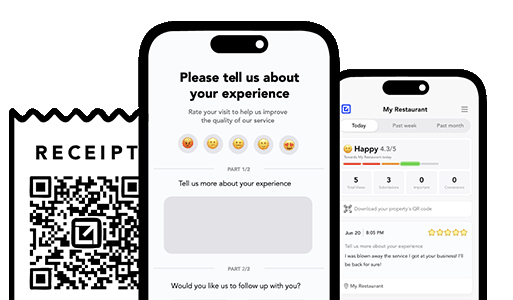
Email clients after every job. Catch issues early, recover unhappy clients fast, and drive repeat work with smart reminders.

Austin Spaeth is the founder of VisibleFeedback, a tool that helps service companies automate post-job follow-ups, catch issues early, and drive repeat work with smart reminders. With a background in software development and a focus on practical customer retention systems, Austin built VisibleFeedback to make it easy to email customers after every job, route problems to the right person, and keep relationships strong without awkward outreach. When he’s not building new features or writing playbooks for service businesses, he’s wrangling his six kids or sneaking in a beach day.
Whether you’re dealing with callbacks, unhappy customers, or low repeat work, we’ll help you tighten the follow up loop.
No credit card required.
