🚀 Start Here For Help

Whether you’re dealing with callbacks, unhappy customers, or low repeat work, we’ll help you tighten the follow up loop.

Turn Jobs Into Repeat Work

VisibleFeedback automatically texts or emails customers after every job.

  • Automated texts or emails post job
  • Catch issues before they go public
  • Reminders that drive repeat jobs
Send My First Follow Up
14 day trial, no credit card required

Recent Tips Insights

8/20/2026
Reviews

How to Ask Patients for Reviews Without Violating HIPAA

Asking patients for reviews is allowed under HIPAA. Disclosing that someone is your patient, or any detail of their care, is where practices get fined. Here is how to build a review request and response process that stays compliant and still fills your listing with 5-star reviews.

8/19/2026
Reviews

How Many Google Reviews Do You Need? A Straight Answer for Local Businesses

There's no universal magic number of Google reviews, but there is a right number for your market. Here's how to figure out how many reviews you actually need to get chosen, plus the recency and rating benchmarks that matter just as much, and a simple system to get there without begging.

7/26/2026
Reviews

How to Create a Google Review Link (Step by Step, Plus a Free QR Code)

A direct Google review link drops a customer straight into the review box in one tap, which is the difference between a review that gets written and one that never does. Here is how to create your Google review link three different ways, turn it into a QR code, and actually get it used.

2/2/2026
HVAC

How Smart HVAC Companies Use Automated Reminders to Drive Repeat Revenue

HVAC companies leave thousands on the table by not reminding past customers to come back. Here are the four reminders every HVAC company should automate.

2/1/2026
Reviews

How to Get More Google Reviews for Your Service Business (Without Being Annoying)

A practical guide to getting more Google reviews for service businesses -- the right way, at the right time, without annoying your customers.

1/31/2026
Retention

The Post-Service Follow-Up Most Service Businesses Skip (And Why It Costs Them Thousands)

Most service businesses finish a job and move on. A simple post-service follow-up can catch problems early, earn reviews, and turn one-time jobs into repeat customers.

1/29/2026
Plumber

What Homeowners Actually Google After Your Plumber Leaves (And How to Be the Answer)

After every plumbing job, homeowners Google their worries before calling you back. Here's what they search for — and how to answer those questions before they ever open a browser.

1/29/2026
Landscaping

The Before-and-After Trap: Why Great Landscaping Work Still Gets Bad Reviews

The work looked amazing on Day 1. The review came on Day 30. What happened in between is the gap most landscaping companies never think about.

1/29/2026
Plumber

Plumbing Callback Horror Stories: How One Missed Follow-Up Creates Negative Reviews

Real-world plumbing callback nightmares that lead to 1-star reviews — and the simple follow-up system that prevents every one of them.

1/29/2026
Electrician

The Electrician's Silent Reputation Killer: Why 'No News' After a Job Is Bad News

Electrical work is invisible — until it isn't. The silence after your electrician leaves is where customer anxiety breeds, bad reviews form, and reputation damage happens.

1/29/2026
Landscaping

Why Your Landscaping Clients Ghost After One Season (And the Retention Loop That Keeps Them)

Most landscaping clients don't leave because they're unhappy. They leave because no one gave them a reason to stay. Here's the retention loop that fixes seasonal churn.

1/29/2026
Roofing

Why Roofers Get the Most Brutal Online Reviews (And the 3 Things That Fix It)

Roofing reviews are uniquely vicious — high cost, invisible work, weather dependency, and long gaps between service make homeowners anxious, skeptical, and quick to blame.

1/28/2026
Tips

The Reminder Revenue Playbook: How Service Businesses Turn One-Time Jobs Into Recurring Revenue

Every completed service job is a future revenue opportunity — if you remind the customer at the right time. This is the playbook for turning one-time work into recurring revenue through smart, automated reminders.

1/28/2026
Tips

The Feedback Loop: How Smart Service Businesses Turn Customer Opinions Into Revenue, Reviews, and Retention

Customer feedback isn't just for surveys and suggestion boxes. When captured at the right moment and routed correctly, it becomes your most powerful tool for preventing bad reviews, improving operations, driving repeat business, and growing revenue.

1/28/2026
Tips

The Complete Guide to Post-Job Follow-Ups for Service Businesses

The definitive guide to building a post-job follow-up system: why it matters, how to time it, what to say, how to handle problems, and how to turn follow-ups into reviews, retention, and revenue.

Show more insights
How to Reduce Callbacks: A Post-Job Follow-Up System for Service Companies
© Photo by Madison Oren on Unsplash

How to Reduce Callbacks: A Post-Job Follow-Up System for Service Companies

TLDR: Callbacks don’t usually happen because your team is incompetent. They happen because small issues slip through: expectations weren’t set, a minor defect shows up later, the customer thinks “it’s still not working,” or they don’t know who to contact. The fix is a simple 3-part system: (A) techs set expectations before leaving, (B) you send a short 24-hour check-in (SMS/email) with a one-tap response, and (C) you run a fast recovery workflow for any “Okay” or “Not good” replies. This article gives the exact step-by-step process, copy/paste templates, simple escalation rules, a lightweight tracking method (New → Contacted → Scheduled → Resolved → Confirmed), and only three metrics that matter: callback rate, time-to-contact for negative replies, and percent confirmed resolved. You can implement this today without any software—and if you want it automated, VisibleFeedback can run the entire loop for you.


1) Why callbacks happen (keep it short)

Callbacks usually come from small, preventable gaps:

  • expectations weren’t set (“I didn’t know this was normal”)
  • a minor defect shows up later (leak, noise, loose fitting, intermittent issue)
  • the customer thinks “it’s still not working” because they don’t know what “done” looks like
  • the customer doesn’t know who to contact, so they escalate emotionally (reviews, disputes, repeated calls)

Most callback reduction is not technical. It’s workflow + response time.


2) The 3-part callback prevention system

Part A: Set expectations at the job (2–3 bullets techs say before leaving)

Your tech should say a short, consistent script before they leave. Not a lecture. Just clarity.

Have techs say:

  • What “normal” looks like for the next 24–48 hours (anything the customer might misinterpret)
  • What to watch for (2–3 clear warning signs)
  • How to reach you (one point of contact)

Example phrasing:

  • “Here’s what to expect…”
  • “Here’s what would be abnormal…”
  • “If anything feels off, text/call this number and we’ll take care of it.”

Part B: 24-hour follow-up (the actual message)

The follow-up should be:

  • short
  • one-tap / low effort
  • sent when the customer has had time to notice issues

The goal isn’t “feedback.” The goal is early detection.


Part C: Fast recovery (triage + scheduling + confirmation)

If someone replies negatively, your job is not to debate. Your job is to:

  • acknowledge fast
  • triage in under 5 minutes
  • schedule a next step with certainty
  • confirm resolution

That’s what prevents “small issue → angry customer → repeated callbacks.”


3) The exact workflow (step-by-step)

Step 1: Send the follow-up at the right time

  • Send follow-up 2–4 hours after job completion
  • If the job finishes late, send it next morning

This balances “fresh in their mind” with “they’ve used it once.”


Step 2: Customer taps: Great / Okay / Not good

You want a response that requires no typing.

  • Great
  • Okay
  • Not good

Step 3: If “Not good”: alert + call within 30–60 minutes

Rule: call fast. Negative responses are time-sensitive.

  • If “Not good,” your office calls within 30–60 minutes during business hours
  • If after hours, call first thing next morning

Goal: turn a complaint into a plan.


Step 4: If “Okay”: ask one question + offer callback

“Okay” means “something is slightly off” or “I’m not sure.”

Ask one question:

  • “What’s the one thing that’s not perfect?”

Then offer a callback:

  • “Want us to call you today to make sure this is handled?”

Step 5: If “Great”: confirm satisfaction + (optional) review ask later

A “Great” response is your confirmation signal.

  • thank them
  • confirm they’re all set
  • do not immediately hammer them with review requests in the same message thread

If you’re going to ask for reviews, do it later and do it consistently (and to everyone), as covered in your review article.


4) Templates (copy/paste)

SMS for repair

Quick check after today’s repair — how’s everything working now?
Great / Okay / Not good

If “Okay”:

Thanks — what’s the one thing that’s not perfect? If you want, we can call you today to make sure it’s handled.

If “Not good”:

Thanks for telling us — we’ll take care of it. We’re going to call you shortly to get this fixed.


SMS for install

Quick check after today’s install — is everything working the way you expected?
Great / Okay / Not good

If “Okay”:

Got it — what’s the one thing you’re unsure about? Want us to call you today to walk through it or schedule a quick adjustment?

If “Not good”:

Understood — we’ll make this right. We’re going to call you shortly and schedule the next step.


Email version

Subject: Quick check after your service

Hi [Name],
Quick check after your service today — how’s everything working now?

Reply with: Great, Okay, or Not good.

If it’s not perfect, reply with the main issue (and a photo if helpful). We’ll take care of it quickly.

Thanks,
[Signature]


Callback request message (when customer reports an issue)

Thanks for letting us know — we’ll take care of it. Can you tell me what you’re seeing and where? If it’s easier, reply with a photo. We can also call you within the next hour.

Keep it calm. Keep it direct.


Resolution confirmation message (“Just confirming it’s fixed…”)

Quick confirmation — is everything fixed and working properly now? Yes/No

If No:

Thanks — what’s still happening? We’ll schedule the next step today.

This “confirm” step is where most teams fail. They assume. Customers remember.


5) Escalation rules (simple)

Keep the rules minimal and enforceable:

  • No response in 24h → resend once (then stop)
  • “Not good” → call within 30–60 min; if no contact within 60 min, backup person alerted
  • Anything safety-related → immediate call

Safety-related examples depend on industry, but if a customer uses words like:

  • “smell,” “sparking,” “smoke,” “leak,” “flooding,” “gas,” “no heat,” “not cooling,” “burning,” “shock” treat it as urgent and call immediately.

6) How to track (lightweight)

You don’t need software to start. Use a sheet, a simple board, or your CRM notes.

Statuses

  • New → Contacted → Scheduled → Resolved → Confirmed

Keep 3 fields

  • Issue type (install question, defect, still not working, scheduling, other)
  • Outcome (fixed, customer educated, follow-up scheduled, refund/credit, unresolved)
  • Time-to-contact (minutes from negative reply to first human contact)

Rule:

  • you don’t move to “Confirmed” until the customer confirms.

7) Metrics to watch (only 3)

Don’t drown in dashboards. Track these three:

1) Callback rate
(Callbacks ÷ total jobs) over a weekly/monthly window

2) Time-to-contact for negative responses
Median minutes (not average)

3) % confirmed resolved
Confirmed ÷ total issues created

If time-to-contact drops and confirmed resolved rises, callback rate usually drops.


8) CTA (2 sentences)

If you want this automated (texts/emails, instant alerts, issue tracking, and confirmation steps), try VisibleFeedback free and run the full follow-up loop without adding office chaos. It’s the same system above—just automated, tracked, and consistent across every job.

VisibleFeedback running on iphones

Turn Jobs Into Repeat Work

Email clients after every job. Catch issues early, recover unhappy clients fast, and drive repeat work with smart reminders.

No card needed, cancel any time

Related articles

Foundation Repair & Waterproofing Follow-Up: More Reviews, Fewer Callbacks

9/3/2026

Foundation repair and basement waterproofing are high-dollar, high-anxiety jobs where a homeowner watching for the next crack or the next wet spot decides your reputation weeks after the crew leaves. A simple foundation repair follow-up catches those worries privately, turns confident homeowners into reviews, and keeps the realtor and inspector referrals coming.

Snow Removal Follow-Up: More Reviews and Locked-In Seasonal Contracts

9/2/2026

You plow the driveway clean at 4am, but the customer judges the job when they walk out at 7 and hit an icy patch by the mailbox. Here's a simple snow removal follow-up system that catches those gripes privately, earns more 5-star reviews, and turns one storm into a signed seasonal contract.

Septic Service Follow-Up: More Reviews, Fewer Callbacks, and Recurring Pumping Revenue

8/26/2026

You pump the tank, check the baffles, and pull out, but the homeowner doesn't really judge the job until a few days later, when a drain gurgles or they spot a soft patch over the drainfield. Here's a simple septic service follow-up system that catches those worries privately, earns more 5-star reviews, and turns one pump-out into a customer who books you every three years.

People also ask

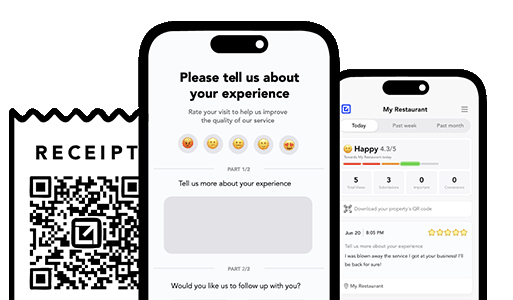
How can I prevent negative reviews from hurting my business? You can’t stop every unhappy customer from sharing feedback, but you can intercept it before it goes public. Tools like VisibleFeedback allow customers to scan a QR code and leave feedback privately. If the feedback is negative, you’re alerted instantly so you can resolve the issue before it turns into a 1-star review.
Why are customer reviews so important for local SEO? Reviews are one of the top local ranking factors on Google. Businesses with consistent positive reviews rank higher in search results and attract more customers. By using VisibleFeedback to capture happy customer moments and guide them to Google or Yelp, you build a steady flow of authentic reviews that improve both your reputation and your local SEO.
What’s the best way to collect customer feedback in 2025? Traditional methods like comment cards and long surveys don’t work anymore, customers want convenience. The easiest way to collect real-time feedback in 2025 is by using QR codes and mobile-friendly forms. VisibleFeedback makes this simple, helping you get instant insights while turning satisfied customers into 5-star reviewers.
What’s the best tip for managing your business reputation? Respond to feedback quickly and professionally. Tools like VisibleFeedback make this easy by notifying you instantly of negative experiences.
How can I encourage customers to leave reviews? Make it simple and convenient, QR codes are perfect for this. VisibleFeedback provides branded QR codes to collect reviews without friction.
What’s a quick way to improve customer experience? Listen to customers and act fast on their feedback. VisibleFeedback makes this possible with real-time alerts and easy feedback channels.
Authored by Austin Spaeth

Austin Spaeth

Austin Spaeth is the founder of VisibleFeedback, a tool that helps service companies automate post-job follow-ups, catch issues early, and drive repeat work with smart reminders. With a background in software development and a focus on practical customer retention systems, Austin built VisibleFeedback to make it easy to email customers after every job, route problems to the right person, and keep relationships strong without awkward outreach. When he’s not building new features or writing playbooks for service businesses, he’s wrangling his six kids or sneaking in a beach day.

🚀 What's your goal? Get a plan ...

🚀 Start Here For Help

Whether you’re dealing with callbacks, unhappy customers, or low repeat work, we’ll help you tighten the follow up loop.

×

👋 Wait! Before You Go

Send your first follow up today! Catch issues early and drive repeat work.

No credit card required.