🚀 Start Here For Help

Whether you’re dealing with callbacks, unhappy customers, or low repeat work, we’ll help you tighten the follow up loop.

Turn Jobs Into Repeat Work

VisibleFeedback automatically texts or emails customers after every job.

  • Automated texts or emails post job
  • Catch issues before they go public
  • Reminders that drive repeat jobs
Send My First Follow Up
14 day trial, no credit card required

Recent Reviews Insights

10/13/2026
follow-ups

Window Tinting Follow-Up: More Reviews, Fewer Callbacks, More Repeat Work

A tint job looks perfect in the bay, then haze and tiny water bubbles show up on the drive home and the customer thinks you sold them junk, before the film has even cured. Here's a simple window tinting follow-up system that explains the curing window privately, earns more 5-star reviews, and turns one car into the second car, the house, and the referral.

10/7/2026
local-seo

How to Rank for 'Near Me' Searches: A Local Service Business Playbook

People search 'plumber near me' or 'HVAC near me' and pick from the three businesses Google shows first. Here is exactly how those three get chosen, and how to become one of them.

10/6/2026
Reviews

How to Manage Reviews Across Multiple Locations Without Enterprise Software

Running two to ten locations means two to ten Google ratings that can drift apart without you noticing. Here is a plain-English system to manage reviews across every location, spot the weak one early, and route problems to the right manager, without paying for an enterprise suite.

10/3/2026
Reviews

How to Get More Houzz Reviews for Your Remodeling or Design Business

Houzz is where homeowners vet remodelers and designers before they spend five or six figures, so your reviews there do a lot of heavy lifting. Here's how to get more Houzz reviews, earn Best of Houzz, and catch problems privately before a long project ends in a public one-star.

10/2/2026
Reviews

Why Did My Google Rating Drop? How to Diagnose and Reverse a Falling Star Average

Watched your Google star average slide and have no idea why? Here are the real reasons a Google rating drops, how to diagnose yours in an afternoon, and how to pull it back up.

10/1/2026
Reviews

Do Old Reviews Still Count? Why Review Recency Quietly Decides Who Wins Local Search

Your best reviews might be two years old, and that is a problem. Here is how review recency affects ranking, trust, and the answers AI assistants give about your business, plus how to keep a fresh flow going.

9/30/2026
Reviews

Why Is My Google Review Not Showing Up? How to Fix Filtered and Missing Reviews

A customer swears they left you a five-star review, but it is nowhere on your profile. Here is why Google reviews do not show up, how to tell filtered from deleted, and how to keep it from happening again.

9/27/2026
Reviews

How to Get More Google Local Services Ads Reviews: The Google Guaranteed Playbook

Google Local Services Ads reviews are separate from your Google Business Profile reviews, and they help decide which home service business shows up first with the Google Guaranteed badge. Here is how to get more of them and protect the ones you have.

9/26/2026
Reviews

How to Get More Apple Maps Reviews: The Apple Business Connect Guide for Local Businesses

Apple Maps now shows its own ratings and reviews, and most local businesses have not claimed their listing or asked a single iPhone customer. Here is how to set up Apple Business Connect, earn more Apple Maps reviews, and catch unhappy customers privately before they post.

9/24/2026
Reviews

How to Get More Thumbtack Reviews for Your Service Business

On Thumbtack you pay for every lead, so your review count is what decides whether that lead actually picks you. Here's how to get more Thumbtack reviews, keep them recent, and catch unhappy customers privately before a one-star tanks your conversion.

9/23/2026
Reviews

The FTC Fake Review Rule: What Local Service Businesses Need to Know

The FTC's rule on consumer reviews and testimonials carries penalties that can top $50,000 per violation, and it applies to the small local business down the street, not just national brands. Here's a plain-English breakdown of what the fake review rule bans, where common tactics like review gating and 'only ask the happy ones' actually stand, and a compliant playbook that still gets you more honest reviews.

9/21/2026
Reviews

Google Review QR Code: How to Make One and Where to Place It

A Google review QR code turns the awkward 'go look us up on Google' moment into a one-tap scan, so a customer standing in front of you can leave a review before they walk out the door. Here is how to make one for free in about five minutes, where to put it so it actually gets used, and the one mistake that turns it into a bad-review machine.

9/14/2026
Reviews

Automated Review Requests: How to Ask Every Customer Without Lifting a Finger

Most businesses that swear they ask for reviews only actually ask when they remember, which is almost never. Automated review requests fix that by sending the ask after every single job, at the right moment, in the same words. Here's how to set them up, when to send, the exact templates, and how to keep them from feeling like spam.

9/12/2026
follow-ups

Window & Door Replacement Follow-Up: More Reviews, Fewer Callbacks

Window and door replacement is a high-dollar job a homeowner feels every day and every windy night. A simple follow-up catches a draft, a sticky latch, or a condensation worry privately before it becomes a callback or a 1-star review, turns happy homeowners into reviews, and keeps the referrals coming from the whole street.

9/9/2026
follow-ups

Auto Glass & Windshield Follow-Up: Fewer Callbacks, More Reviews

Windshield work looks perfect the day you finish it, then a leak, a wind whistle, or an ADAS warning light shows up on the drive home and you find out from a 1-star review. Here's an auto glass follow-up system that catches the redo privately, earns more 5-star reviews, and turns one chip repair into fleet, dealer, and referral work.

Show more insights
How to Get More Apple Maps Reviews: The Apple Business Connect Guide for Local Businesses
© Photo via Unsplash

How to Get More Apple Maps Reviews: The Apple Business Connect Guide for Local Businesses

TLDR: Apple Maps now shows its own native ratings and reviews, and you manage them through a free dashboard called Apple Business Connect. To get more Apple Maps reviews, claim your listing, fill the place card out fully, and ask happy iPhone customers the same day the job wraps. Put a private check-in between your customers and your public listing, so the frustrated ones reach you first and never post a low rating in the first place. Below is exactly how Apple Maps reviews work now, the setup steps most owners skip, and a private-first system that protects the rating you are building.


Why Apple Maps reviews suddenly matter for local businesses

For years, Apple Maps was the platform local businesses could safely ignore. It pulled its ratings from Yelp and TripAdvisor, so there was nothing to manage and nothing to ask for. That is over. Apple Maps now has its own ratings and reviews, written and posted right inside the Maps app on the iPhone, and shown on the place card that customers see when they look you up.

That is a big deal for one simple reason: roughly half of US smartphones are iPhones, and iPhone owners skew toward higher household income. When one of them asks Siri for “a plumber near me,” taps a business in Apple Maps, or navigates to an address with CarPlay, they are looking at your Apple Maps listing, not your Google profile. If that listing is blank or thin while a competitor’s is filled out with photos and real reviews, you lose the job before the phone ever rings.

Learning how to get more Apple Maps reviews is really about not leaving half your local market staring at an empty listing. And because almost no local businesses have claimed their Apple listing yet, this is one of the rare marketing moves where a couple of hours of work puts you ahead of nearly everyone in your area.

iPhone customerSiri, Spotlight, CarPlayApple Maps cardYour place listingApple Maps reviewsThe trust checkNew customerOr a lost leadHalf of local buyers reach you through Apple, not Google, and the reviews decide the call

Wait, does Apple Maps actually have reviews now?

Yes. This is the part that trips up most owners, because the old assumption (“Apple just uses Yelp”) is stuck in everyone’s head. Apple has been building out its own business tools, and the place card an iPhone user sees now supports native Apple Maps ratings and reviews, along with photos, hours, and other details you control.

You manage all of it through Apple Business Connect, a free dashboard Apple launched so businesses can own their own listing instead of relying on third parties. Think of it as Apple’s answer to a Google Business Profile. If you have never logged in, your listing is almost certainly running on whatever data Apple scraped together, which means wrong hours, a missing photo, or an old address are all live right now for anyone on an iPhone.

The takeaway: the reviews are real, the listing is yours to claim, and doing nothing is a choice that leaves a sloppy first impression in front of half your market.

How to claim and set up your Apple Business Connect listing

Before you ask a single customer for a review, get the listing itself in shape. A filled-out place card makes every future review land on something that looks legitimate and cared for.

  1. Sign in at Apple Business Connect. Go to the Apple Business Connect site and sign in with an Apple Account (you can create a free one for the business). This is the hub for everything below.
  2. Find and claim your business. Search for your business, claim the listing, and complete Apple’s verification. Verification can take a little time, so start this step first and move on while it processes.
  3. Fill the place card out completely. Add your correct name, address, phone, website, hours (including holiday hours), and the right business categories. Accuracy here also helps Siri and Apple Maps surface you for the right searches.
  4. Add real photos. Upload clean, current photos of your team, your work, your storefront, or your trucks. A listing with genuine photos reads as active and trustworthy, and it stands out next to competitors who left theirs blank.
  5. Add your logo and a “Showcase” if it fits. Apple Business Connect lets you post promotions and highlights. Even a simple, current showcase signals that a real business is paying attention to this listing.
  6. Decide your review reply habit now. Plan to respond calmly and quickly to critical reviews and to thank the good ones. Future readers judge you as much by how you respond as by the rating itself.

How to get more Apple Maps reviews, step by step

With the listing claimed and polished, here is what actually grows the number.

1. Ask the same day, while goodwill is highest

Timing is the biggest lever there is. A customer who just watched you solve their problem is at peak happiness. Wait a week and the feeling fades, the details blur, and the ask starts to feel like a chore. Ask within a day of finishing the work and far more people follow through.

2. Notice who is on an iPhone

You do not need anyone to guess their way through the Maps app. When you are wrapping up a job, it is easy to notice whether a customer is holding an iPhone, and iPhone users are exactly the ones who can leave an Apple Maps review. Point Android users to Google and iPhone users to Apple Maps, and you build both profiles at once instead of sending people to a platform they cannot use.

3. Make the ask specific and simple

“Leave us a review sometime” gets ignored. A specific, friendly ask gets action. Tell the customer where to go and why it helps: “If you’re on an iPhone, would you mind leaving us a quick review in Apple Maps? It really helps other neighbors find us.” Clear beats clever every time.

4. Make it a weekly habit, not a once-a-year push

The businesses that win at reviews do not run a big campaign once and stop. They ask every happy customer, every week, on both Apple and Google. A steady trickle of recent reviews beats a stale pile, because buyers care most about what happened lately. This is the same discipline behind getting more Google reviews for your service business; the platform changes, the habit does not.

VisibleFeedback Icon

Automate follow ups after every job

Catch issues early and drive repeat work with smart reminders.

Start A Free Trial

The mistake that costs you: letting unhappy customers rate you in public first

Here is the trap. If your whole system is “ask everyone for a public review,” you are also inviting your unhappy customers to broadcast their frustration on your Apple Maps listing, where it sits under your name for every future buyer to read. One raw one-star review next to a handful of good ones drags down the average and, worse, plants doubt in the exact moment a new customer is deciding whether to call.

The fix is a review funnel: figure out how a customer feels before you point them anywhere public. Ask a simple private question after the job. Happy customers get pointed to Apple Maps or Google. Unhappy customers reach you privately, so you can fix the problem before it ever becomes a public rating. Most bad reviews do not come from people who are impossible to please; they come from people who felt ignored. A private-first check-in gives them the attention that keeps them off your listing.

This is exactly what feedback funnels are built to do, and it is the difference between a listing full of reviews and a listing you are afraid to open.

Job finishedPrivate check-in sentHow was everything?Happy customerSent to Apple Mapsand Google, public reviewUnhappy customerRouted privately to youFixed before it goes public

Doing this by hand after every single job is where good intentions go to die. You get busy, the follow-up slips, and the only people who remember to post are the ones who are angry. This is the gap tools like VisibleFeedback are built to close: it automatically texts or emails each customer after the job, catches the unhappy ones privately before they reach Apple Maps or Google, routes the issue to the right person for a fast fix, and points the happy ones to leave a public review. It was built to catch issues before they show up on Yelp, Google, or now Apple Maps, and to do it on autopilot so nothing slips.

Apple Maps vs Google vs Yelp: where to focus

You do not have to choose one platform. But it helps to know what each is for so you spend your asks wisely.

PlatformBest forWho you reachEffort to claim
Apple MapsiPhone users, Siri and CarPlay searches~50% of US phones, higher-income skewFree via Apple Business Connect, low competition today
GoogleThe largest share of local search overallEveryone, especially Android and desktopFree via Google Business Profile, high competition
YelpRestaurants, some home services, review-heavy shoppersBuyers who actively read reviewsFree, but strict review-solicitation rules

The smart move for most local businesses: treat Google and Apple Maps as the two you actively build, since between them they cover nearly every phone in your service area. Yelp matters more in some verticals than others. If iPhone customers are a big part of your base, Apple Maps is the fastest-growing gap you can close right now. It is a close cousin to the point made in why salon reviews matter most on iOS: the platform your best customers actually carry deserves your attention.

A simple 5-step Apple Maps review checklist

  • Claim your business in Apple Business Connect and complete verification
  • Fill the place card out completely: hours, categories, phone, website, real photos
  • Add a private check-in after every job so unhappy customers reach you first
  • Ask happy iPhone customers for an Apple Maps review the same day the work wraps
  • Reply to every review, calmly on the critical ones and warmly on the good ones

Frequently asked questions about Apple Maps reviews

Does Apple Maps have its own reviews now, or does it still use Yelp?

Apple Maps now supports its own native ratings and reviews on the place card, managed through Apple Business Connect. It no longer depends solely on third-party sources the way it once did, which is why claiming and maintaining your listing matters.

Is Apple Business Connect free?

Yes. Apple Business Connect is free to use. You claim your business, verify it, and manage your listing, photos, and reviews at no cost, similar to a Google Business Profile.

How do customers leave an Apple Maps review?

Customers leave reviews from the Maps app on an iPhone by finding your business, opening the place card, and using the ratings and reviews section. Because it is on the device they already carry, the ask is easy for iPhone users; you just need to point them there the same day.

Can I get an unfair or fake Apple Maps review removed?

You can report reviews that violate Apple’s guidelines through your listing, though the better protection is prevention. A private check-in that catches unhappy customers before they post keeps most negative ratings from ever appearing. For the ones that do slip through on any platform, the same calm, public response approach applies; see our guide on creating a review link and how to make the good path as easy as possible.

How many Apple Maps reviews do I need?

There is no magic number, but recency and steadiness matter more than a giant one-time pile. A handful of recent, genuine reviews, refreshed every month, does more for a new buyer’s confidence than a stack of old ones. Build the weekly asking habit and the count takes care of itself.

The bottom line

Apple Maps quietly became a real review platform, and half your local market is looking at a listing you have probably never touched. Claim it in Apple Business Connect, fill it out, and start asking happy iPhone customers the same day you finish the job. Then protect the rating you are building by catching unhappy customers privately, before their frustration turns into a public one-star. Do those two things consistently and you will be ahead of nearly every competitor in your area, because most of them still think Apple Maps runs on Yelp.

Start a free 14-day trial of VisibleFeedback, no credit card required.
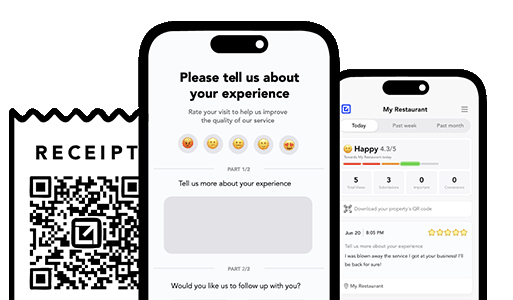
VisibleFeedback running on iphones

Turn Jobs Into Repeat Work

Email clients after every job. Catch issues early, recover unhappy clients fast, and drive repeat work with smart reminders.

No card needed, cancel any time

Related articles

How to Get More Houzz Reviews for Your Remodeling or Design Business

10/3/2026

Houzz is where homeowners vet remodelers and designers before they spend five or six figures, so your reviews there do a lot of heavy lifting. Here's how to get more Houzz reviews, earn Best of Houzz, and catch problems privately before a long project ends in a public one-star.

How to Get More Google Local Services Ads Reviews: The Google Guaranteed Playbook

9/27/2026

Google Local Services Ads reviews are separate from your Google Business Profile reviews, and they help decide which home service business shows up first with the Google Guaranteed badge. Here is how to get more of them and protect the ones you have.

How to Get More Thumbtack Reviews for Your Service Business

9/24/2026

On Thumbtack you pay for every lead, so your review count is what decides whether that lead actually picks you. Here's how to get more Thumbtack reviews, keep them recent, and catch unhappy customers privately before a one-star tanks your conversion.

People also ask

How can I prevent negative reviews from hurting my business? You can’t stop every unhappy customer from sharing feedback, but you can intercept it before it goes public. Tools like VisibleFeedback allow customers to scan a QR code and leave feedback privately. If the feedback is negative, you’re alerted instantly so you can resolve the issue before it turns into a 1-star review.
Why are customer reviews so important for local SEO? Reviews are one of the top local ranking factors on Google. Businesses with consistent positive reviews rank higher in search results and attract more customers. By using VisibleFeedback to capture happy customer moments and guide them to Google or Yelp, you build a steady flow of authentic reviews that improve both your reputation and your local SEO.
What’s the best way to collect customer feedback in 2025? Traditional methods like comment cards and long surveys don’t work anymore, customers want convenience. The easiest way to collect real-time feedback in 2025 is by using QR codes and mobile-friendly forms. VisibleFeedback makes this simple, helping you get instant insights while turning satisfied customers into 5-star reviewers.
How can I get more positive reviews? The key to getting more positive reviews is asking at the right moment, when the customer is satisfied and the experience is still fresh. With tools like VisibleFeedback, you can use smart prompts, follow-up messages, and QR codes to make it easy and natural for happy customers to leave a review, while privately capturing negative feedback before it goes public. For a full breakdown of proven strategies, check out our guide on how to get more reviews.
What’s the fastest way to handle negative reviews? Respond quickly, stay professional, and try to resolve the issue privately if possible. Negative feedback is often a chance to turn frustration into loyalty, if you act fast. Tools like VisibleFeedback help by catching complaints before they go public. For a full playbook on how to handle bad reviews and protect your reputation, check out our guide on what to do when you get negative feedback.
Do private feedback tools really work? Yes, customers prefer private channels to share complaints. VisibleFeedback captures these insights and helps you turn unhappy customers into loyal ones.
Authored by Austin Spaeth

Austin Spaeth

Austin Spaeth is the founder of VisibleFeedback, a tool that helps service companies automate post-job follow-ups, catch issues early, and drive repeat work with smart reminders. With a background in software development and a focus on practical customer retention systems, Austin built VisibleFeedback to make it easy to email customers after every job, route problems to the right person, and keep relationships strong without awkward outreach. When he’s not building new features or writing playbooks for service businesses, he’s wrangling his six kids or sneaking in a beach day.

🚀 What's your goal? Get a plan ...

🚀 Start Here For Help

Whether you’re dealing with callbacks, unhappy customers, or low repeat work, we’ll help you tighten the follow up loop.

×

👋 Wait! Before You Go

Send your first follow up today! Catch issues early and drive repeat work.

No credit card required.