8/7/2025
Reviews
Smart Ways to Get More Reviews [Guide]
Practical, proven ways for any business to get more authentic reviews.

TLDR: Google Local Services Ads reviews are a separate review system from your Google Business Profile, they live on the LSA profile that appears above the map with the Google Guaranteed or Google Screened badge, and they help decide your ad ranking. To get more Local Services Ads reviews, send Google’s official LSA review link the same day the job wraps, ask every satisfied customer, and reply to every review. Then protect your score by putting a private check-in in front of the ask, so unhappy customers reach you before they post. Below is exactly where the link lives, how ranking works, and the private-first system that keeps your rating clean.
If you run Local Services Ads, here is the single most important fact most owners miss: your Google Local Services Ads reviews are separate from your Google Business Profile reviews. They are two different systems. You can have 300 glowing reviews on your Google Business Profile and still show a nearly empty LSA profile in the exact spot where new customers decide who to call.
Local Services Ads are the listings that appear at the very top of Google for home service searches, above the regular map pack and organic results, each with a Google Guaranteed badge (for home services) or a Google Screened badge (for professional services). When someone searches “plumber near me” or “emergency electrician,” those top few slots are where the clicks and calls go. The reviews shown there come from Google’s own Local Services review system, not from your Business Profile.
That is why learning how to get more Google Local Services Ads reviews is a distinct job from getting more Google reviews in general. The link is different, the profile is different, and the payoff is different: LSA reviews do not just build trust, they feed the ranking that decides whether you appear in those top slots at all.
Google does not publish a formula, but it is clear about the main levers that decide which businesses show in the top LSA slots. Reviews are one of the biggest.
The practical takeaway: you cannot out-bid a weak review profile. Two shops can spend the same and the one with more and better LSA reviews gets the cheaper leads and the higher click-through. Reviews are the lever with the best long-term return, because unlike your bid, they compound.
This is the part that unlocks everything. To land a review on your LSA profile, you have to use Google’s official Local Services review request, not your regular Google review link.
One catch worth knowing: Google may associate reviews with leads that came through your ad, and it filters reviews it cannot validate. That is normal. Keep asking every real customer through the official link, and the count builds.
With the link in hand, here is what actually grows the number.
Timing is the biggest lever you control. A customer who just watched you fix their problem is at peak happiness. Wait a week and the feeling fades and the ask feels like a chore. Send the LSA review link within a day of finishing the work and far more people follow through. This is the same discipline behind getting more Google reviews for your service business; the link changes, the habit does not.
“Leave us a review sometime” gets ignored. Tell the customer exactly what to do and why it helps: “Thanks again for today. If you have a minute, here’s a link to leave us a quick review on Google, it really helps other neighbors find us.” Then paste the LSA link. Clear beats clever every time.
The businesses that win at reviews do not run one big push and stop. They ask every satisfied customer, every week. A steady stream of recent reviews beats a stale pile, because both Google’s ranking and human buyers care most about what happened lately.
Respond warmly to the good ones and calmly to the critical ones. Future customers read your responses as closely as the ratings, and a measured reply to a hard review often does more good than the review does harm. If you are not sure what to say, our templates for responding to bad reviews give you a starting point.
LSA reviews and Google Business Profile reviews are separate, so send both links over time. The same happy customer can strengthen your ad ranking and your map ranking. If you also run other platforms, the approach for Angi reviews follows the same private-first logic.

Here is the trap. If your whole system is “send the review link to everyone,” you are also handing your unhappy customers a megaphone pointed at the exact profile that decides your ad ranking. One raw one-star review next to a handful of good ones drags down your LSA score, and a lower score means worse placement and pricier leads. On a pay-per-lead platform, that hurts twice.
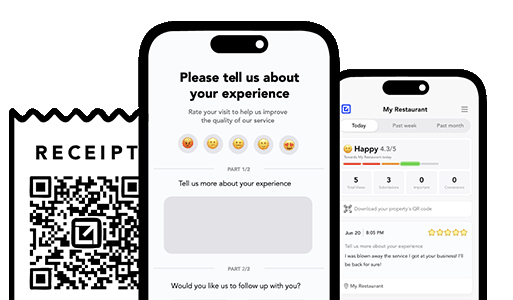
The fix is a review funnel: figure out how a customer feels before you point them anywhere public. Ask a simple private question after the job. Happy customers get the LSA and Google links. Unhappy customers reach you privately, so you can fix the problem before it becomes a public rating. Most bad reviews do not come from people who are impossible to please; they come from people who felt ignored. A private-first check-in gives them the attention that keeps them off your profile. This is exactly what feedback funnels are built to do.
Doing this by hand after every single job is where good intentions go to die. You get busy, the follow-up slips, and the only people who remember to post are the ones who are angry. This is the gap tools like VisibleFeedback are built to close: it automatically texts or emails each customer after the job, catches the unhappy ones privately before they reach your public profiles, routes the issue to the right person for a fast fix, and points the happy ones to the right review link. VisibleFeedback was built to catch issues before they show up on Google or your Local Services profile, and to do it on autopilot so nothing slips. It runs from $65 a month with no contract, a fraction of what the big reputation suites charge.
You do not have to choose. But it helps to know what each is for so you spend your asks wisely.
| Local Services Ads reviews | Google Business Profile reviews | |
|---|---|---|
| Where they show | The LSA slots above the map, with the Guaranteed/Screened badge | The map pack, Maps, and your Business Profile panel |
| How to request | Google’s official LSA review link or in-tool request | Your Google review link or short link |
| Main payoff | Feeds your paid ad ranking and click-through | Feeds organic local map ranking and trust |
| Who can leave one | Customers Google can associate with your service | Any customer with a Google account |
| Who should prioritize | Home and professional services running LSAs | Every local business |
The smart move for a business running Local Services Ads: build both, but treat the LSA review link as a first-class part of your follow-up, since it is the one most owners forget and the one tied directly to what you are already paying for.
No. Local Services Ads reviews live on your LSA profile, the listing that shows above the map with the Google Guaranteed or Google Screened badge, and they use a separate review link. Your Google Business Profile reviews are a different system on your map listing. A customer can leave both, but they are requested through different links.
Sign in to the Local Services Ads dashboard or the Local Services app, go to the reviews section, and use Google’s request option to get a shareable link or send the request directly to a customer by text or email. That link routes the review to your LSA profile.
Yes. Your review score, review volume, and review recency are among the signals Google uses to rank Local Services Ads, alongside proximity, responsiveness, availability, and budget. A stronger review profile generally means better placement and better-converting leads.
Google filters reviews it cannot validate, and it tends to associate reviews with customers it can tie to a lead. If a review does not appear, it may have been filtered. The fix is simple: keep asking every genuine customer through the official link, and the verified ones accumulate.
Prevention beats cleanup. Put a private check-in in front of your review ask so unhappy customers reach you before they post. Fix the problem, and most never leave a public rating at all. For the ones that slip through on any platform, reply calmly and professionally rather than trying to get every review removed.
Google Local Services Ads reviews are their own system, tied to the profile that decides whether you show up first and how much your leads cost. Most owners never send the official LSA review link because they assume their Google reviews carry over. They do not. Grab the link, send it the same day you finish the job, and ask every satisfied customer. Then protect the score you are building by catching unhappy customers privately, before their frustration turns into a public one-star. Do those two things consistently and you will out-rank competitors who are spending just as much but leaving their LSA profile empty.
Start a free 14-day trial of VisibleFeedback, no credit card required.
Email clients after every job. Catch issues early, recover unhappy clients fast, and drive repeat work with smart reminders.

Austin Spaeth is the founder of VisibleFeedback, a tool that helps service companies automate post-job follow-ups, catch issues early, and drive repeat work with smart reminders. With a background in software development and a focus on practical customer retention systems, Austin built VisibleFeedback to make it easy to email customers after every job, route problems to the right person, and keep relationships strong without awkward outreach. When he’s not building new features or writing playbooks for service businesses, he’s wrangling his six kids or sneaking in a beach day.
Whether you’re dealing with callbacks, unhappy customers, or low repeat work, we’ll help you tighten the follow up loop.
No credit card required.
