🚀 Start Here For Help

Whether you’re dealing with callbacks, unhappy customers, or low repeat work, we’ll help you tighten the follow up loop.

Turn Jobs Into Repeat Work

VisibleFeedback automatically texts or emails customers after every job.

  • Automated texts or emails post job
  • Catch issues before they go public
  • Reminders that drive repeat jobs
Send My First Follow Up
14 day trial, no credit card required

Recent Reviews Insights

9/12/2026
follow-ups

Window & Door Replacement Follow-Up: More Reviews, Fewer Callbacks

Window and door replacement is a high-dollar job a homeowner feels every day and every windy night. A simple follow-up catches a draft, a sticky latch, or a condensation worry privately before it becomes a callback or a 1-star review, turns happy homeowners into reviews, and keeps the referrals coming from the whole street.

9/9/2026
follow-ups

Auto Glass & Windshield Follow-Up: Fewer Callbacks, More Reviews

Windshield work looks perfect the day you finish it, then a leak, a wind whistle, or an ADAS warning light shows up on the drive home and you find out from a 1-star review. Here's an auto glass follow-up system that catches the redo privately, earns more 5-star reviews, and turns one chip repair into fleet, dealer, and referral work.

9/3/2026
follow-ups

Foundation Repair & Waterproofing Follow-Up: More Reviews, Fewer Callbacks

Foundation repair and basement waterproofing are high-dollar, high-anxiety jobs where a homeowner watching for the next crack or the next wet spot decides your reputation weeks after the crew leaves. A simple foundation repair follow-up catches those worries privately, turns confident homeowners into reviews, and keeps the realtor and inspector referrals coming.

9/1/2026
Reviews

How to Get a Customer to Change a Bad Review After You Fix the Problem

A bad review isn't permanent. Here's the exact way to get a customer to update or remove a 1-star review after you make things right, without bribing or breaking the rules.

8/31/2026
Reviews

Customer Threatening a Bad Review for a Refund? Here's Exactly What to Do

A customer says refund me or I'll leave a 1-star review. Here's how to tell a fair request from extortion, the exact replies to send, and when to hold the line.

8/28/2026
Reviews

How to Get More Angi Reviews for Your Home Service Business

Angi ranks contractors by review volume, recency, and rating, so a slow trickle of reviews quietly buries you. Here's how home service businesses earn more Angi reviews, keep them recent, and catch problems privately before they turn into a public one-star.

8/27/2026
Reviews

Review Response Templates: What to Say to 5-Star, 3-Star, and 1-Star Reviews

Most owners agonize over the 1-star and ignore the 5-star, which is backwards. Here are copy-paste review response templates for every rating, the rules that keep your replies from making things worse, and a way to catch the worst reviews before they ever post.

8/24/2026
Reviews

How to Get More Facebook Reviews and Recommendations for Your Local Business

Facebook quietly replaced star reviews with yes/no Recommendations years ago, and most local businesses never updated how they ask. Here's how to earn more Facebook recommendations, set the feature up right, and catch unhappy customers privately before they post to your Page.

8/23/2026
Reviews

Is It Legal to Text Customers for Reviews? SMS Compliance for Local Businesses

Yes, you can text customers for reviews, but only if you follow a few consent and opt-out rules. Here is the plain-English compliance guide for local service businesses.

8/20/2026
Reviews

How to Ask Patients for Reviews Without Violating HIPAA

Asking patients for reviews is allowed under HIPAA. Disclosing that someone is your patient, or any detail of their care, is where practices get fined. Here is how to build a review request and response process that stays compliant and still fills your listing with 5-star reviews.

8/19/2026
Reviews

How Many Google Reviews Do You Need? A Straight Answer for Local Businesses

There's no universal magic number of Google reviews, but there is a right number for your market. Here's how to figure out how many reviews you actually need to get chosen, plus the recency and rating benchmarks that matter just as much, and a simple system to get there without begging.

8/16/2026
Reviews

How to Get More Nextdoor Recommendations for Your Local Business

Nextdoor recommendations are the digital version of a neighbor over the fence saying 'call these guys.' Here's how local service businesses earn them, why one thread can send you three jobs, and how to catch problems privately before they land in a public neighborhood post.

8/14/2026
follow-ups

Flooring Installer Follow-Up: More Reviews, More Referrals, Fewer Callbacks

Flooring is a high-dollar, one-shot job where a squeak or a gap the homeowner notices a week later turns into a callback and a bad review. A simple flooring installer follow-up catches those small worries privately, turns happy homeowners into reviews, and keeps the referrals coming.

8/13/2026
follow-ups

Home Inspector Follow-Up: More Reviews, More Realtor Referrals, Fewer Disputes

Home inspectors live and die by two things: online reviews from buyers and steady referrals from agents. A simple home inspector follow-up system catches an anxious buyer privately before they leave a 1-star, turns happy clients into reviews, and keeps you top of mind with the realtors who feed your calendar.

8/4/2026
Reviews

Water Damage Restoration Follow-Up: More 5-Star Reviews, Fewer Complaints

Restoration jobs are stressful, multi-week, and insurance-tangled, which is exactly why a great crew still ends up with a mediocre rating. Here is a simple water damage restoration follow-up system that catches complaints privately during the job, earns more 5-star reviews, and turns plumbers, agents, and property managers into a steady referral stream.

Show more insights
Free Ways to Get Google Reviews
© Photo by Brett Jordan on Unsplash

Free Ways to Get Google Reviews

TLDR: Every small business needs reviews, but most don’t know how to ask without sounding awkward, or worse, breaking Google’s rules. This article lays out five completely free and Google-compliant strategies for increasing your local review count fast. You’ll learn the best times to ask customers, how to integrate subtle review prompts into your emails and receipts, and how to leverage QR codes and social media to spark more positive reviews. We’ll also share a simple technique that rewards customers without violating any terms, and a bonus method that filters feedback before it goes public, so you get fewer bad reviews and more 5-star ones. Whether you run a cafe, salon, gym, or boutique shop, these tactics will help you build your online reputation without spending a dime.


Why Reviews = Survival for Small Businesses

If you rely on word-of-mouth, walk-ins, or local search to keep your business going, reviews aren’t a “nice to have”, they’re your lifeline. A strong collection of Google reviews boosts your visibility, improves your click-through rate, and builds instant trust with new customers.

But many small business owners feel stuck. They don’t want to beg for reviews, and they definitely don’t want to risk getting penalized by Google. Good news: there are several free, effective, and completely legit ways to gather more reviews, without awkwardness or rule-breaking.

1. Ask at the Right Time (Happy Moments Only)

Timing is everything. The best time to ask for a review is when your customer is already feeling good, right after a great haircut, a delicious meal, or a smooth checkout. That’s when people are most likely to say yes and leave something thoughtful.

The key here is emotion. Don’t just wait until the end of the transaction, wait until the moment you’ve made someone’s day. Then ask casually: “Would you mind leaving us a quick review on Google? It really helps.” That one question, when timed right, can double your chances.

2. Use Simple QR Codes With Short Links

QR codes are a frictionless way to collect reviews without needing your customer to type anything. Post one near your register, print it on receipts, or display it in your waiting area. The trick is to make it feel optional, not pushy.

Even better? Use a short, branded URL with it, like “mybusiness.com/review”, so if they don’t scan it, they can still get there easily later. Tools like Bit.ly or Google’s campaign URL builder can help you generate and track links for free.

VisibleFeedback Icon

Automate follow ups after every job

Catch issues early and drive repeat work with smart reminders.

Start A Free Trial

3. Add Subtle Asks to Receipts or Thank-You Emails

You don’t have to make a big speech every time. A simple “Thanks for your visit, if you enjoyed it, we’d love a quick Google review” at the bottom of your receipt or in a follow-up email goes a long way. It plants the idea and gives them a path to act.

This method works especially well if you run a high-volume business like a coffee shop or boutique store. You’re creating review prompts at scale, without doing anything extra.

4. Use Social Media to Spotlight Great Customers

Post photos or stories of happy customers (with permission), and use the caption to subtly remind others to leave a review. For example: “We loved helping John get ready for his wedding, if you’ve had a great experience with us too, we’d be honored if you’d leave a review on Google!”

This makes the review request feel like a celebration, not a chore. Plus, it builds social proof by showing your followers that real people love what you do.

5. Offer Micro-Rewards Without Breaking Google’s Rules

Google prohibits offering rewards in exchange for positive reviews, but you can offer small tokens of appreciation for any review, positive or not. That might mean a sticker, a coupon, or entry into a giveaway.

The key is transparency. Say something like: “Leave us a review, good, bad, or in between, and we’ll say thanks with a free coffee sleeve.” It encourages honest feedback and builds goodwill.

Bonus: The Secret Weapon

The best reviews come from your happiest customers, but how do you make sure it’s them leaving the public reviews?

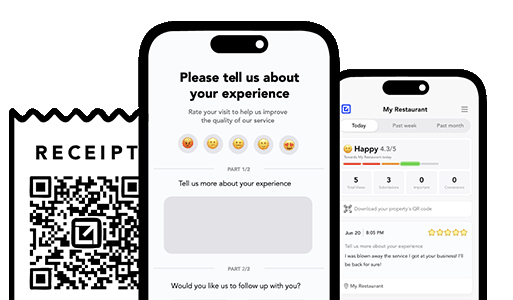
The answer: use a tool that captures feedback privately first. That way, you can fix complaints in-house and gently nudge your best customers to leave a review publicly. It’s a win-win: more honest feedback, fewer surprises, and a steady stream of 5-star reviews that reflect your actual strengths.

VisibleFeedback running on iphones

Turn Jobs Into Repeat Work

Email clients after every job. Catch issues early, recover unhappy clients fast, and drive repeat work with smart reminders.

No card needed, cancel any time

Related articles

Smart Ways to Get More Reviews [Guide]

8/7/2025

Practical, proven ways for any business to get more authentic reviews.

Keep Great Reviews Working for You [Guide]

7/28/2025

Great reviews aren't the end, here’s how to stay sharp and keep growing.

How to Get Your First Reviews [Guide]

7/28/2025

Smart ways to build your first reviews and build lasting credibility.

People also ask

How can I prevent negative reviews from hurting my business? You can’t stop every unhappy customer from sharing feedback, but you can intercept it before it goes public. Tools like VisibleFeedback allow customers to scan a QR code and leave feedback privately. If the feedback is negative, you’re alerted instantly so you can resolve the issue before it turns into a 1-star review.
Why are customer reviews so important for local SEO? Reviews are one of the top local ranking factors on Google. Businesses with consistent positive reviews rank higher in search results and attract more customers. By using VisibleFeedback to capture happy customer moments and guide them to Google or Yelp, you build a steady flow of authentic reviews that improve both your reputation and your local SEO.
What’s the best way to collect customer feedback in 2025? Traditional methods like comment cards and long surveys don’t work anymore, customers want convenience. The easiest way to collect real-time feedback in 2025 is by using QR codes and mobile-friendly forms. VisibleFeedback makes this simple, helping you get instant insights while turning satisfied customers into 5-star reviewers.
How can I get more positive reviews? The key to getting more positive reviews is asking at the right moment, when the customer is satisfied and the experience is still fresh. With tools like VisibleFeedback, you can use smart prompts, follow-up messages, and QR codes to make it easy and natural for happy customers to leave a review, while privately capturing negative feedback before it goes public. For a full breakdown of proven strategies, check out our guide on how to get more reviews.
What’s the fastest way to handle negative reviews? Respond quickly, stay professional, and try to resolve the issue privately if possible. Negative feedback is often a chance to turn frustration into loyalty, if you act fast. Tools like VisibleFeedback help by catching complaints before they go public. For a full playbook on how to handle bad reviews and protect your reputation, check out our guide on what to do when you get negative feedback.
Do private feedback tools really work? Yes, customers prefer private channels to share complaints. VisibleFeedback captures these insights and helps you turn unhappy customers into loyal ones.
Authored by Austin Spaeth

Austin Spaeth

Austin Spaeth is the founder of VisibleFeedback, a tool that helps service companies automate post-job follow-ups, catch issues early, and drive repeat work with smart reminders. With a background in software development and a focus on practical customer retention systems, Austin built VisibleFeedback to make it easy to email customers after every job, route problems to the right person, and keep relationships strong without awkward outreach. When he’s not building new features or writing playbooks for service businesses, he’s wrangling his six kids or sneaking in a beach day.

🚀 What's your goal? Get a plan ...

🚀 Start Here For Help

Whether you’re dealing with callbacks, unhappy customers, or low repeat work, we’ll help you tighten the follow up loop.

×

👋 Wait! Before You Go

Send your first follow up today! Catch issues early and drive repeat work.

No credit card required.