TLDR: Google Business Profile optimization is not one big project; it is a handful of fields filled out correctly and a habit you keep. Pick the right primary category, list every service, add real photos most weeks, and keep a steady stream of recent reviews coming in. Reviews and review recency are among the strongest local ranking signals, which is why the fastest, most durable win is a post-job follow-up that catches unhappy customers privately and points happy ones to Google. Below is the full 2026 checklist, the fields that matter, the ones that don’t, and the review system that lifts your rating and your ranking at the same time.
Why Google Business Profile optimization is the highest-leverage thing you can do
If you run a local service business, your Google Business Profile is the storefront almost every customer sees before they ever call. Someone searches “plumber near me” or “HVAC repair [your town],” and Google shows a map with three businesses pinned above everything else. That box is the Map Pack, and the businesses inside it get the overwhelming majority of the clicks and calls. Everything below it fights over scraps.
Here is the good news. Google Business Profile optimization is free, and most of your competitors are doing it badly. They claimed the listing years ago, dropped in a logo, and never touched it again. That means a fully optimized profile is one of the few marketing moves where a one-person shop can outrank a company ten times its size, without spending a dollar on ads.
Google decides who lands in the Map Pack using three broad things: relevance (does your profile match the search), distance (how close you are to the searcher), and prominence (how established and trusted you look). You cannot move your building closer to every customer. You can absolutely make your profile more relevant and more prominent, and that is what this checklist is about.
What does “optimizing” a Google Business Profile actually mean?
It means filling out every field Google gives you, keeping it accurate, and staying active. That is genuinely most of it. Google favors complete, current profiles over abandoned ones, so the businesses that treat the listing as a living thing quietly pull ahead. Here is the field-by-field checklist.
The complete-profile checklist
Business name. Use your real name exactly as it appears on your signage and paperwork. Do not stuff keywords into it, like “Joe’s Plumbing | Best Emergency Plumber [City].” Google’s guidelines prohibit it, and competitors can report you.
Primary category. This is the single most important field for relevance. More on it below.
Additional categories. Add every category that genuinely applies. A plumber might add “Water heater repair service” and “Drainage service.”
Services. List each service as its own line item with a short description. This is where the keywords you skipped in the business name belong.
Service area. If you go to the customer, list the towns and zip codes you actually serve. Do not list a hundred cities you would never drive to.
Hours. Keep them current, and set special hours for holidays. Wrong hours are a top cause of angry reviews.
Phone number. Use a local number, and make it the same number listed on your website and everywhere else online.
Website link. Point it to a relevant page, not a broken or parked domain.
Business description. Write a plain, honest 750 characters about what you do and where. It is not a big ranking factor, so do not agonize over it, but do fill it in.
Photos. Real photos of your team, trucks, and finished work. Cover this below.
Products or menu. Use these sections if they fit your business; they add relevance and detail.
Attributes. Check the ones that apply, like “women-owned,” “free estimates,” or “24-hour service.”
Messaging and booking. Turn these on if you can respond quickly; a slow reply is worse than none.
Get your primary category right
Your primary category does more for your ranking than any other single field. Choosing “Plumber” versus “Emergency plumbing service” changes which searches you appear for. Search for your main service and see which category your top-ranking competitors use, then match the one that best describes the money-making core of your business. You can always add the others as secondary categories, but the primary one carries the most weight, so spend a few minutes getting it right.
How much do reviews affect Google Business Profile ranking?
A lot. Reviews are one of the strongest prominence signals Google has, and here is the part most owners miss: recency counts as much as volume. A steady flow of recent reviews tells Google your business is active and trusted right now. Forty reviews that all landed three years ago look like a business that peaked and faded. Ten reviews from this quarter look like a business people are choosing today.
That is why “get a big pile of reviews once” is the wrong goal. The goal is a steady drip, every week, forever. It also means the way you ask matters. If you blast every customer with a review link, you invite the frustrated ones to vent in public right alongside the happy ones, and a single fresh one-star review drags down the exact recency signal you were trying to build.
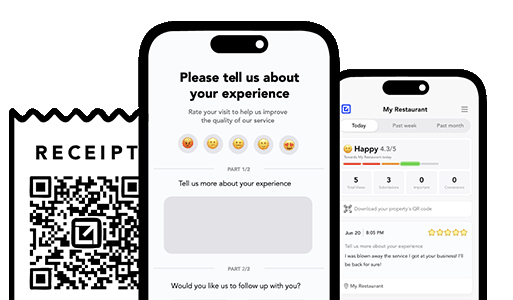
The businesses that win this do the opposite of a public free-for-all. They put a private step first. After each job, they send a quick check-in that asks how it went. Unhappy customers reply privately, so the business can fix the problem before it ever becomes a public review. Happy customers get pointed straight to Google. This is the core idea behind feedback funnels, and it is the single highest-leverage habit for a local business.
Two more review habits Google rewards:
Reply to every review, good and bad. A thoughtful reply signals an active, engaged business, and it shows future customers how you handle things. Keep responses to negative reviews calm and solution-focused; our guide on what to do about bad reviews has templates.
Make the ask effortless. Send a direct Google review link the same day the job wraps, while the experience is fresh. A link they can tap beats “look us up on Google” every time.
Automate follow ups after every job
Catch issues early and drive repeat work with smart reminders.
Google can tell whether a profile is tended or abandoned, and it favors the tended ones. You do not need to post daily, despite what some agencies claim. A realistic cadence is a few fresh photos most weeks and an occasional update.
Photos. Upload real before-and-after job shots, your team, your trucks, your storefront. Businesses with regularly updated photos tend to get more calls and direction requests than those with a lone stock image. Skip the generic stock; customers can smell it.
Google Posts. Use them for genuine updates: a seasonal offer, a new service, a reminder before a busy season. They expire, so they reward a light, steady rhythm rather than a one-time blast.
Q&A. Seed your own frequently asked questions and answer them. You control the framing, and you save your future customers a phone call.
Optimized vs neglected: what Google actually sees
Signal
Neglected profile
Optimized profile
Primary category
Generic or wrong
Matches the core service and top competitors
Services
One vague blurb
Every service listed with descriptions
Photos
One logo from 2019
Fresh real job photos most weeks
Reviews
40, newest is 2 years old
Steady drip, several this month
Review replies
None
Every review answered
Hours and info
Outdated, causes complaints
Current, holiday hours set
Result
Buried below the Map Pack
Competing for the top three
If your profile looks like the left column, you are not being punished so much as passed over. The fix is not complicated. It is the right column, kept up.
A private-first system beats chasing reviews
Here is where most Google Business Profile advice stops short. It tells you to “get more reviews” without telling you how to avoid drowning in the bad ones. If you simply push every customer toward Google, you are rolling the dice in public. The customer whose appointment ran late, the one who felt rushed, the one with a small fixable complaint, they all get the same megaphone as your happy customers.
A smarter system puts a private channel first. Tools like VisibleFeedback send an automated check-in after every job, so dissatisfaction lands in your inbox instead of on your public profile. You get an instant alert, you fix the problem, and that customer often ends up more loyal than if nothing had gone wrong. Meanwhile the happy customers get routed to Google, feeding the steady, recent-review stream that actually moves your ranking. VisibleFeedback was built to catch issues before they show up on Google or Yelp, and to keep the reminders going so repeat customers come back on their own.
The retention side matters for ranking too. Recurring reminders bring past customers back for seasonal service, which creates fresh jobs, which creates fresh review opportunities, which keeps your recency signal strong. It compounds. For more on that loop, see how post-job follow-ups turn one-time jobs into ongoing relationships. And unlike the enterprise reputation platforms that charge $299 to $699 a month on annual contracts, a private-first tool like this runs about $65 a month with no contract, which matters when you are a small shop watching every expense.
The 15-minute Google Business Profile tune-up
Short on time? Do these seven things today and you will already beat most competitors:
Confirm your primary category matches your core service and your top competitors.
List every service as its own item with a one-line description.
Upload five real, recent photos of your work and team.
Fix your hours and add holiday hours.
Reply to every review you have not answered yet.
Create your Google review link and save it in your phone.
Set up a same-day follow-up so you never miss another review or complaint.
Frequently asked questions
How long does Google Business Profile optimization take to work? Some changes, like fixing your category or hours, can affect what you show up for within days. The review and activity signals build over weeks and months. Think of it as a garden, not a light switch: steady tending beats one big push.
Is Google Business Profile the same as Google My Business? Yes, just a rename. Google retired the “Google My Business” name and app and folded management into Search and Maps directly, plus the Business Profile Manager. The listing and the strategy are the same.
How many reviews do I need to rank in the Map Pack? There is no magic number; it depends on your market and how your competitors look. What matters more is a steady flow of recent reviews and a healthy average. For a fuller answer, see how many Google reviews you actually need.
Can I put keywords in my business name to rank higher? Do not. It violates Google’s guidelines, competitors can report it, and Google can suspend your profile. Put your keywords in the services and description fields instead, where they belong.
What is the single most important thing to fix first? Your primary category, then your reviews. The category decides which searches you can even appear for, and recent reviews decide how high you place among the businesses that qualify.
The takeaway
Google Business Profile optimization is not a secret or a trick. It is a complete profile, the right category, real photos, and a steady stream of recent reviews, kept up over time. The one habit that ties it all together is a post-job follow-up that catches problems privately and sends happy customers to Google. Do that, and you build the exact prominence signal Google rewards while your competitors let their listings gather dust.
How can I prevent negative reviews from hurting my business? You can’t stop every unhappy customer from sharing feedback, but you can intercept it before it goes public. Tools like VisibleFeedback allow customers to scan a QR code and leave feedback privately. If the feedback is negative, you’re alerted instantly so you can resolve the issue before it turns into a 1-star review.Why are customer reviews so important for local SEO? Reviews are one of the top local ranking factors on Google. Businesses with consistent positive reviews rank higher in search results and attract more customers. By using VisibleFeedback to capture happy customer moments and guide them to Google or Yelp, you build a steady flow of authentic reviews that improve both your reputation and your local SEO.What’s the best way to collect customer feedback in 2025? Traditional methods like comment cards and long surveys don’t work anymore, customers want convenience. The easiest way to collect real-time feedback in 2025 is by using QR codes and mobile-friendly forms. VisibleFeedback makes this simple, helping you get instant insights while turning satisfied customers into 5-star reviewers.What’s the most effective marketing strategy for local businesses in 2025? Combine strong local SEO, social proof, and customer engagement. VisibleFeedback supports this by boosting your review count and online reputation.How can businesses use feedback in their marketing? Positive feedback makes great social proof. Share it on your website, social channels, and ads. VisibleFeedback simplifies collecting and showcasing real feedback.Why is reputation management part of marketing? Your online reputation directly affects conversions. Tools like VisibleFeedback help keep your reputation strong by managing negative feedback privately.
Austin Spaeth is the founder of VisibleFeedback, a tool that helps service companies automate post-job follow-ups, catch issues early, and drive repeat work with smart reminders. With a background in software development and a focus on practical customer retention systems, Austin built VisibleFeedback to make it easy to email customers after every job, route problems to the right person, and keep relationships strong without awkward outreach. When he’s not building new features or writing playbooks for service businesses, he’s wrangling his six kids or sneaking in a beach day.
🚀 What's your goal? Get a plan ...
🚀 Start Here For Help
Whether you’re dealing with callbacks, unhappy customers, or low repeat work, we’ll help you tighten the follow up loop.