🚀 Start Here For Help

Whether you’re dealing with callbacks, unhappy customers, or low repeat work, we’ll help you tighten the follow up loop.

Turn Jobs Into Repeat Work

VisibleFeedback automatically texts or emails customers after every job.

  • Automated texts or emails post job
  • Catch issues before they go public
  • Reminders that drive repeat jobs
Send My First Follow Up
14 day trial, no credit card required

Recent follow Insights

10/5/2026
Retention

Childcare Center Follow-Up: More 5-Star Reviews and Full Enrollment

Parents rarely tell a daycare they're unhappy. They just stop showing up and warn every other parent in the group chat. Here's a simple childcare center follow-up system that catches worries privately, earns more 5-star reviews, and keeps your rooms full.

9/28/2026
Retention

Lawn Care Customer Retention: The Follow-Up System That Keeps Customers on Plan

Lawn care is a recurring-revenue business, but most cancellations come from silence between treatments, not price. Here is a simple follow-up system that keeps customers on plan, cuts callbacks, and turns happy lawns into fresh reviews.

9/25/2026
follow-ups

EV Charger Installation Follow-Up: More 5-Star Reviews and Fewer Callbacks

A home EV charger install looks finished the moment the breaker flips, then the customer's car won't pull full amperage overnight, the app won't pair, or the GFCI keeps tripping in the cold, and they post about it before they call you. Here's a simple EV charger installation follow-up system that catches those problems privately, earns more 5-star reviews, and turns one install into panel upgrades, referrals, and repeat electrical work.

9/22/2026
Retention

Locksmith Follow-Up: More Reviews and Fewer Callbacks

People pick a locksmith in a panic, off a phone screen, based almost entirely on stars and trust. That makes reviews the whole ballgame, and a single unanswered gripe about a sticky lock or a car key that stopped working can scare off the next stranded customer. Here's a simple locksmith follow-up system that catches problems privately, earns more 5-star reviews, and turns lockouts and rekeys into commercial accounts and referrals.

9/20/2026
Retention

Tire Shop Follow-Up: More 5-Star Reviews and Repeat Business

A tire job looks finished the second the car rolls off the lift, then two days later there's a steering wheel shimmy at 70, a TPMS light that won't go out, or a slow leak from the repair, and the customer posts about it before they ever call you back. Here's a simple tire shop follow-up system that catches those problems privately, earns more 5-star reviews, and turns one set of tires into years of rotations, changeovers, and repeat business.

9/19/2026
Retention

Photographer Follow-Up: More 5-Star Reviews and Repeat Bookings

Photography runs almost entirely on reviews and referrals, and both are decided in the days after you deliver the gallery. Here's a simple photographer follow-up system that catches a quietly disappointed client privately before they post, earns more 5-star reviews, and turns one session into anniversary shoots, mini-sessions, and word-of-mouth bookings.

9/18/2026
Retention

Catering Follow-Up: More 5-Star Reviews and Repeat Event Bookings

Catering runs on referrals and repeat events, yet most caterers never hear from the host again after the last tray is packed. Here's a simple catering follow-up system that catches problems privately, earns more 5-star reviews, and books the next event before your competitor gets the call.

9/17/2026
follow-ups

Auto Body Shop Follow-Up: More Reviews and Fewer Comebacks

You blend the paint, close the panel gaps, detail it, and hand back the keys. Then a week later the customer notices the door doesn't shut quite right, the clear coat looks off in daylight, or the insurance check never covered the rental. Here's an auto body shop follow-up that catches those problems privately, earns more 5-star reviews, and keeps comebacks and 1-star surprises off your Google page.

9/16/2026
Retention

Optometry Follow-Up: Get More Reviews and Fill Every Annual Eye Exam

New patients pick an eye doctor by reading reviews, and a blurry new prescription or a frame that never felt right can turn a fine exam into a bad one. Here is a simple optometry follow-up system that catches problems privately, earns more 5-star reviews, and fills every annual eye exam.

9/15/2026
Retention

Dog Boarding Follow-Up: More 5-Star Reviews and Repeat Bookings

Boarding and daycare owners hand you the thing they love most, then spend the whole stay reading between the lines. Here's a simple dog boarding follow-up system that catches worries privately, earns more 5-star reviews, and books the next stay before your competitor does.

9/14/2026
Reviews

Automated Review Requests: How to Ask Every Customer Without Lifting a Finger

Most businesses that swear they ask for reviews only actually ask when they remember, which is almost never. Automated review requests fix that by sending the ask after every single job, at the right moment, in the same words. Here's how to set them up, when to send, the exact templates, and how to keep them from feeling like spam.

9/13/2026
Retention

Security System Installation Follow-Up: More Reviews, Fewer Callbacks

You mount the panel, place the sensors, pair the cameras, walk the homeowner through the app, and drive off. Then a door contact drifts, a camera drops Wi-Fi, or the alarm trips at 2 a.m. for no reason, and the customer's first real experience of your work is a false alarm and a city fine. Here's a security system installation follow-up that catches offline sensors and false-alarm frustration privately, earns more 5-star reviews, and protects the monitoring subscription that pays you every month.

9/12/2026
follow-ups

Window & Door Replacement Follow-Up: More Reviews, Fewer Callbacks

Window and door replacement is a high-dollar job a homeowner feels every day and every windy night. A simple follow-up catches a draft, a sticky latch, or a condensation worry privately before it becomes a callback or a 1-star review, turns happy homeowners into reviews, and keeps the referrals coming from the whole street.

9/10/2026
Retention

Concrete & Paving Contractor Follow-Up: More Reviews and Repeat Referrals

You pour a clean driveway, finish the edges, tell the homeowner to stay off it for a week, and drive away. Then a hairline crack shows up along a joint, a white haze blooms across the surface, and they assume you cut corners. Here's a concrete and paving contractor follow-up system that catches curing questions and real defects privately, earns more 5-star reviews, and turns one driveway into resealing work and a street full of referrals.

9/9/2026
follow-ups

Auto Glass & Windshield Follow-Up: Fewer Callbacks, More Reviews

Windshield work looks perfect the day you finish it, then a leak, a wind whistle, or an ADAS warning light shows up on the drive home and you find out from a 1-star review. Here's an auto glass follow-up system that catches the redo privately, earns more 5-star reviews, and turns one chip repair into fleet, dealer, and referral work.

Show more insights
SMS vs Email Follow-Ups: What Works Best for Service Companies
© Photo by Austin Distel on Unsplash

SMS vs Email Follow-Ups: What Works Best for Service Companies

TLDR: Service businesses love asking “Should we follow up by SMS or email?” because it sounds like a marketing question. It’s actually an operations and reputation question. If you need a fast response to catch problems before they become bad reviews, SMS wins. If you need longer context, documentation, photos, maintenance instructions, or a multi-step nurture sequence, email wins. The best setup is often both: SMS for the one-tap feedback loop (happy vs unhappy), and email for the detailed follow-up that reinforces value and drives repeat work. This article breaks down when to use SMS vs email, what to send in each, timing rules, templates, and the common mistakes that tank response rates or create 1-star reviews. You’ll also see how VisibleFeedback routes unhappy customers into private resolution and sends review prompts only to happy customers, which is the safest way to protect reputation while still growing reviews.


Why This Choice Matters (It’s Not Just “Preference”)

A follow-up has three real jobs:

1) Catch dissatisfaction privately before it becomes a public review
2) Reinforce the value delivered so the customer feels good about the purchase
3) Drive the next action (maintenance plan, repeat service, referral, review)

SMS and email excel at different parts of that job. When businesses pick the wrong channel, they see:

  • low response rates (feedback loop fails)
  • delayed discovery of problems (reviews get wrecked)
  • awkward “please review us” blasts (customers get annoyed)
  • missed repeat work (customer forgets you)

The right channel depends on what you’re trying to accomplish in that specific message.


SMS vs Email: The Honest Comparison

Here’s the blunt truth.

SMS is best for: - fast replies - one-tap feedback (“Great / Okay / Not good”) - urgent issue recovery (same-day rescue) - short reminders (confirmations, “tech on the way,” “anything else?”) Email is best for: - long explanations and education (what was done, why it mattered) - photos, reports, invoices, warranties, and documentation - upsells that need context (maintenance plans, service agreements) - nurture sequences (seasonal checklists, “what to expect,” referrals)

If you try to do email’s job in SMS, you’ll annoy people.
If you try to do SMS’s job in email, you’ll get ignored.


The Core Rule: Use SMS for Signals, Email for Details

A good follow-up system uses two layers:

  • Layer 1 (SMS): get a fast signal about satisfaction
  • Layer 2 (Email): deliver the “value story” and next steps

Why this works:

  • People will tap an SMS link or button quickly
  • People will read email when it contains useful info (receipt, summary, instructions)
  • You avoid stuffing a wall of text into a message that should be 10 seconds long

When SMS Wins (Most Service Companies Underuse This)

SMS is your best tool for protecting reviews because it’s the fastest way to learn if someone is unhappy.

Use SMS when:

  • the job is complete and you need confirmation it’s solved
  • you want to catch “minor annoyances” before they escalate
  • you want a high response rate from normal customers (not just angry ones)
Best SMS formats: - one question - one tap - one clear next step

Examples of one-tap prompts:

  • “How did we do today?” 🙂 😐 🙁
  • “Did we solve the problem?” Yes / No
  • “Would you use us again?” Yes / No

What to avoid in SMS:

  • long surveys
  • multiple questions
  • asking for a review before you know they’re happy
  • “reply with a paragraph” requests (that filters for angry people)

When Email Wins (And Why It Still Matters)

Email isn’t dead. It’s just bad at getting immediate feedback.

Use email when:

  • you want to document work performed (especially for installs or big repairs)
  • you want to show value (before/after photos, checklist, readings)
  • you want to reduce buyer’s remorse (“here’s what was fixed and why it matters”)
  • you want predictable repeat work (seasonal reminders + maintenance education)

Email also gives you space for:

  • warranties and product registration
  • “how to use your new thermostat” instructions
  • safety notes and common questions
  • referral programs and service plan offers

If your email is generic fluff, it gets ignored.
If your email is useful, it gets saved and forwarded.


Same-Day vs Next-Day vs 3-Day Timing by Channel

A practical default:

SMS timing - emergency repair: 1–3 hours after completion - routine service: next day (late morning to early afternoon) - install: 2–4 days after completion Email timing - immediately: receipt + work summary + what was done - next day: “what to expect” + maintenance tips + contact options - 7–14 days: “any questions?” + light upsell (maintenance plan) if appropriate

Why the split works:

  • SMS catches problems fast
  • Email reinforces value and prevents regret later

The Best Setup: Use Both (But Don’t Spam)

For most service companies, the best system is:

  • SMS: one-tap feedback loop
  • Email: detailed follow-up with value recap

A simple flow: 1) Job completed → send email summary/receipt 2) Next day (or 3 days for installs) → send SMS one-tap check 3) If positive → review ask via SMS (or email if your customers respond better there) 4) If negative → private resolution workflow (no public links)

This avoids the #1 dumb mistake: blasting a review link to everyone regardless of experience.


Templates: SMS Follow-Ups That Actually Get Replies

Keep these short. Short wins.

SMS: routine service (next day) > Hey [Name] — quick 2-second check: how did we do yesterday? 🙂 Great 😐 Okay 🙁 Not good SMS: emergency service (same day) > Hey [Name] — quick check: is everything working normally now? Yes / No SMS: install (3 days) > Hey [Name] — checking in on the new install. How’s everything going so far? 🙂 Great 😐 Okay 🙁 Not good SMS: review request (only after positive signal) > Love to hear it. If you have 30 seconds, would you mind leaving a quick Google review? It helps a lot. SMS: negative branch (private capture) > Thanks for telling us. What should we fix? Comfort / Noise / Cleanliness / Communication / Didn’t solve issue / Other We’ll follow up shortly.

Templates: Email Follow-Ups That Build Trust and Repeat Work

Email is where you prove professionalism and reduce “was this worth it?” feelings.

Email subject lines that work - “Your service summary from [Business]” - “What we fixed today + what to expect” - “Install complete: quick tips and next steps” - “Your maintenance checklist and recommendations” Email structure that works 1) Short thank you (one sentence) 2) Work performed summary (bullets) 3) What to expect next (1–3 bullets) 4) How to get help quickly (reply/call/text) 5) Optional: maintenance plan or next recommended service

Example email body outline:

  • “Here’s what we did today…”
  • “If you notice X, that’s normal for the first 24–48 hours…”
  • “If anything feels off, reply directly and we’ll take care of it…”

What to avoid in email:

  • giant walls of text
  • generic marketing newsletters immediately after a job
  • begging for reviews in the same message as the invoice (bad vibe)

What to Avoid (This Is How You Create Bad Reviews)

These are common, and they’re self-inflicted wounds.

1) Asking for a review before asking for feedback
If someone is unhappy, you just handed them a stage.

2) Sending a long survey
Only angry people complete long surveys. That increases risk, not insight.

3) Using the same message for every job type
Emergency, routine, and installs have different emotional timelines.

4) No response system for negative feedback
If you ask and then ignore it, customers learn to go public next time.

5) Too many messages
One email summary + one SMS check is plenty for most jobs. Don’t get cute.


Compliance and Deliverability Notes (Practical, Not Legal Advice)

Two realities:

  • SMS requires cleaner consent practices. If you text customers, make sure you have permission and an easy opt-out (“Reply STOP to opt out”). This is especially important in the U.S.
  • Email deliverability depends on usefulness. If your emails are just marketing, they’ll hit Promotions or spam. If they contain invoices, summaries, and instructions, they get opened.

If you don’t have a clean consent and opt-out flow for SMS, fix that before scaling.


How VisibleFeedback Makes This Easier (Without Duct Tape)

You can build this with a texting platform, forms, a CRM, and a spreadsheet. It works until it doesn’t.

VisibleFeedback is built for the follow-up loop service businesses actually need:

  • SMS-friendly one-tap feedback capture
  • automatic branching (happy → review ask, unhappy → private resolution)
  • instant alerts for low ratings so you can respond fast
  • structured categories that reveal patterns (not just one-off complaints)
  • clean links/pages you can use in SMS, email, receipts, and QR codes

The biggest advantage isn’t “sending messages.” It’s routing outcomes safely:

  • unhappy customers get handled privately
  • happy customers drive reviews and repeat work

A Simple “Choose Your Channel” Checklist

Use this checklist before sending anything.

If your goal is fast feedback → SMS
If your goal is education, proof, documentation → Email
If your goal is review growth safely → SMS after a positive signal
If your goal is repeat work / maintenance plan → Email (with optional SMS reminder later)

Most companies should run:

  • email summary immediately
  • SMS one-tap check at the right time (next day for routine, 3 days for installs, same day for emergencies)

Bottom Line

SMS is the best channel for immediate satisfaction signals and saving reviews. Email is the best channel for reinforcing value, delivering details, and driving longer-term retention.

If you pick one: pick SMS for the one-tap feedback loop.
If you want the best results: run SMS for signals and email for details, with strict routing so unhappy customers never get shoved toward public reviews.

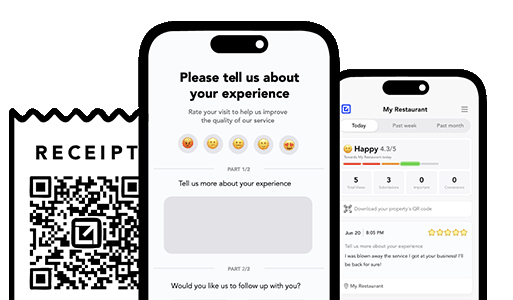
VisibleFeedback running on iphones

Turn Jobs Into Repeat Work

Email clients after every job. Catch issues early, recover unhappy clients fast, and drive repeat work with smart reminders.

No card needed, cancel any time

Related articles

Childcare Center Follow-Up: More 5-Star Reviews and Full Enrollment

10/5/2026

Parents rarely tell a daycare they're unhappy. They just stop showing up and warn every other parent in the group chat. Here's a simple childcare center follow-up system that catches worries privately, earns more 5-star reviews, and keeps your rooms full.

Lawn Care Customer Retention: The Follow-Up System That Keeps Customers on Plan

9/28/2026

Lawn care is a recurring-revenue business, but most cancellations come from silence between treatments, not price. Here is a simple follow-up system that keeps customers on plan, cuts callbacks, and turns happy lawns into fresh reviews.

EV Charger Installation Follow-Up: More 5-Star Reviews and Fewer Callbacks

9/25/2026

A home EV charger install looks finished the moment the breaker flips, then the customer's car won't pull full amperage overnight, the app won't pair, or the GFCI keeps tripping in the cold, and they post about it before they call you. Here's a simple EV charger installation follow-up system that catches those problems privately, earns more 5-star reviews, and turns one install into panel upgrades, referrals, and repeat electrical work.

People also ask

How can I prevent negative reviews from hurting my business? You can’t stop every unhappy customer from sharing feedback, but you can intercept it before it goes public. Tools like VisibleFeedback allow customers to scan a QR code and leave feedback privately. If the feedback is negative, you’re alerted instantly so you can resolve the issue before it turns into a 1-star review.
Why are customer reviews so important for local SEO? Reviews are one of the top local ranking factors on Google. Businesses with consistent positive reviews rank higher in search results and attract more customers. By using VisibleFeedback to capture happy customer moments and guide them to Google or Yelp, you build a steady flow of authentic reviews that improve both your reputation and your local SEO.
What’s the best way to collect customer feedback in 2025? Traditional methods like comment cards and long surveys don’t work anymore, customers want convenience. The easiest way to collect real-time feedback in 2025 is by using QR codes and mobile-friendly forms. VisibleFeedback makes this simple, helping you get instant insights while turning satisfied customers into 5-star reviewers.
Authored by Austin Spaeth

Austin Spaeth

Austin Spaeth is the founder of VisibleFeedback, a tool that helps service companies automate post-job follow-ups, catch issues early, and drive repeat work with smart reminders. With a background in software development and a focus on practical customer retention systems, Austin built VisibleFeedback to make it easy to email customers after every job, route problems to the right person, and keep relationships strong without awkward outreach. When he’s not building new features or writing playbooks for service businesses, he’s wrangling his six kids or sneaking in a beach day.

🚀 What's your goal? Get a plan ...

🚀 Start Here For Help

Whether you’re dealing with callbacks, unhappy customers, or low repeat work, we’ll help you tighten the follow up loop.

×

👋 Wait! Before You Go

Send your first follow up today! Catch issues early and drive repeat work.

No credit card required.