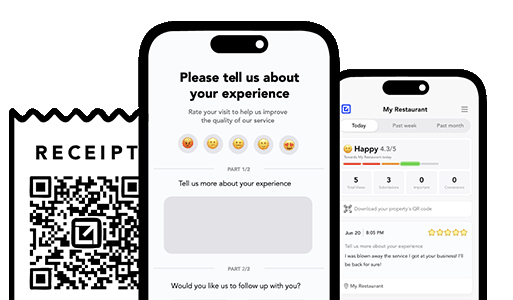
TLDR: Most service businesses treat customer feedback as something they collect occasionally. That’s not a feedback loop — that’s a dead end. A real feedback loop captures opinions at the right moment, routes them to the right person, acts on them in real time, and uses the data to improve operations. This guide shows you how to build that system from scratch.
What a Feedback Loop Actually Is (And Isn’t)
This is NOT a feedback loop:
- Sending a post-job survey that nobody fills out
- Reading Yelp reviews once a month
- Asking “how’d we do?” and ignoring the answer
- A suggestion box (digital or physical) that nobody checks
This IS a feedback loop:
- Customer completes a job
- You ask a specific, easy-to-answer question at the right time
- Positive responses route to a review request
- Negative responses route to your office with an alert
- Your office acts on negative feedback fast
- Resolution is confirmed with the customer
- Patterns are identified and used to improve operations
- The cycle repeats — every job, every time
A loop has no dead ends. Every input produces an output. Every output feeds back into the system. That’s what makes it powerful.
The Three Types of Feedback That Matter
Not all feedback is equal. Service businesses need to capture three distinct types, each serving a different purpose:
Type 1: Operational Feedback
What it is: Information about what happened during the job. Examples: “The tech was late.” “They left a mess.” “The repair didn’t hold.” “The install looks crooked.” When to capture: Same day and next day (during the post-job check-in). What it does: Identifies specific, fixable problems. Drives immediate resolution. Feeds quality improvement over time.
Type 2: Satisfaction Feedback
What it is: The customer’s overall feeling about the experience. Examples: “Great service.” “Pretty good.” “Not happy.” The emoji-scale response. When to capture: Same day and next day. What it does: Sorts customers into response buckets (promoters, neutrals, detractors). Determines who gets a review request and who needs intervention.
Type 3: Advocacy Feedback
What it is: Willingness to recommend or publicly endorse. Examples: A 5-star Google review. A referral to a neighbor. A social media mention. When to capture: After confirmed positive satisfaction (never before). What it does: Generates public social proof. Drives organic customer acquisition. Builds the review profile that fuels search ranking.
The loop connects all three:
Job completed
    ↓
Operational check-in → Catches problems → Resolves fast
    ↓
Satisfaction check → Positive? → Advocacy request (review/referral)
                   → Negative? → Triage → Resolution → Satisfaction re-check
    ↓
Data logged → Patterns identified → Operations improved
    ↓
Better operations → Fewer problems → More positive → More advocacy
    ↓
[Repeat]
That’s the loop. Every job feeds it. Every cycle makes the next one better.
Part 1: Capturing Feedback (The Right Way)
Why most feedback collection fails
Traditional feedback methods fail because they violate one or more of these rules:
| Rule | Why it matters | Common violation |
|---|
| Be fast | Ask during the anxiety window, not weeks later | Post-job survey email sent 2 weeks later |
| Be easy | One tap, not 10 questions | 15-question satisfaction survey |
| Be specific | “Is the repair holding?” not “rate us 1-10” | Generic NPS question with no context |
| Be private first | Let them tell you before they tell Google | “Leave us a review!” as the first message |
| Be actionable | Route responses to someone who can act | Feedback collected into a report nobody reads |
The capture framework
Step 1: Same-day check-in (Operational + Satisfaction)
“Quick check — is everything [working/looking] as expected after today’s [service]? 🙂 Great / 😐 Okay / 🙁 Not good”
One message captures both types:
- The response tells you if there’s an operational issue (the thing isn’t working)
- The emoji selection tells you the satisfaction level
Step 2: Next-day follow-up (Operational — deeper)
“Follow-up check — still [working/looking] good today? Yes / No”
This catches issues that developed overnight or after the system/product has had time to settle. It’s the second data point that confirms the first.
Step 3: Advocacy trigger (only after positive)
“Glad everything’s great! If you have a minute, an honest Google review helps. [Link]”
This only fires after Step 1 and/or Step 2 came back positive. The customer has already confirmed they’re happy — the review ask is a natural next step, not a pressure tactic.
Part 2: Routing Feedback (Where It Needs to Go)
Capturing feedback is useless if it goes nowhere. The routing rules are simple:
Positive feedback → Review request + retention pool
When a customer responds positively:
- They get a review request (with direct link)
- They’re flagged as a satisfied customer in your system
- They’re eligible for future retention touchpoints (seasonal reminders, referral asks)
Neutral feedback → Soft follow-up
When a customer responds “Okay” or “Mostly”:
- Send a gentle follow-up: “Anything we could improve? We’d love to hear.”
- If they mention something specific, treat it as a negative (triage and resolve)
- If they don’t reply, log as neutral — don’t push
Negative feedback → Instant alert + triage
When a customer responds negatively:
- Immediate alert to the office (or owner, or manager)
- Acknowledge within 30 minutes
- Triage the issue (what, where, how bad)
- Assign an owner and a timeline
- Execute resolution
- Confirm with the customer
- If resolved positively → review request
The routing ensures that no feedback is wasted. Every response triggers an appropriate next action.

Automate follow ups after every job
Catch issues early and drive repeat work with smart reminders.
Part 3: Acting on Negative Feedback (The Revenue Protection Layer)
Negative feedback is where the real money is. Not because negative feedback is good — but because what you do with it determines whether you lose a customer and gain a bad review, or save a customer and gain a great review.
The cost of inaction
When negative feedback is ignored:
- The customer tells 9-15 people about the bad experience
- They leave a 1-star review (visible to hundreds of potential customers)
- You lose the customer’s lifetime value ($1,000-$50,000+ depending on trade and frequency)
- You spend more on advertising to offset the rating damage
The value of action
When negative feedback is acted on quickly:
- 70% of customers who complain will do business with you again if the complaint is resolved
- 95% will do business with you again if the complaint is resolved quickly
- Many will leave a positive review mentioning the resolution
- The customer becomes more loyal than if the problem never happened (service recovery paradox)
The resolution timeline
| Response time | Customer perception | Review probability |
|---|
| Within 30 minutes | “They care and they’re on it” | Low (problem being solved) |
| Within 2 hours | “They got back to me pretty fast” | Low-medium |
| Within 24 hours | “At least they responded” | Medium |
| Within 48 hours | “Took them long enough” | High |
| 72+ hours or never | “They don’t care” | Very high |
Speed is the most important variable in negative feedback handling. Nothing else compensates for a slow response.
Part 4: Mining Feedback for Operational Gold
Here’s where the loop becomes an improvement engine — not just a review tool.
What patterns reveal
After 30-60 days of consistent feedback collection, you’ll start seeing patterns:
By tech/crew:
- “Tech A gets 95% positive responses. Tech B gets 78%.”
- Why? Maybe Tech B doesn’t clean up well. Maybe they don’t explain what was done. Maybe their work quality needs improvement.
By service type:
- “Drain clearing has a 12% next-day negative rate. Everything else is under 5%.”
- Why? Maybe drain clearing needs better expectation-setting (a cleared drain can re-clog if there’s a deeper issue). Maybe you need to upsell camera inspections more consistently.
By time of day:
- “Jobs completed after 4 PM have a higher negative rate.”
- Why? Maybe techs are rushing at the end of the day. Maybe customers are more anxious in the evening and need more reassurance.
By customer type:
- “New customers signal negative at 2x the rate of repeat customers.”
- Why? New customers don’t know your quality yet. They’re more anxious and more likely to interpret normal things as problems. Maybe new customers need more detailed same-day messages.
What to do with patterns
| Pattern | Action |
|---|
| One tech underperforms | Coaching, ride-along, or reassignment |
| One service type overperforms on complaints | Better expectation-setting scripts for that job |
| Evening jobs underperform | Adjust scheduling or add a specific evening check-in |
| New customers more anxious | Enhanced first-job follow-up sequence |
This is the “loop” part of the feedback loop. Data feeds improvement. Improvement reduces future problems. Fewer problems increase satisfaction. Higher satisfaction generates more positive reviews. More reviews drive more business. More business generates more data. The loop accelerates.
Part 5: The Revenue Math
Let’s quantify what the feedback loop is worth for a typical service business doing 60 jobs per month.
Review generation value
| Metric | Without loop | With loop |
|---|
| Reviews per month | 2 (organic) | 10-12 (systematic) |
| Reviews per year | 24 | 120-144 |
| Average rating | 4.1 (negatives hit harder) | 4.7 (negatives intercepted) |
| Google local pack ranking | Low | High |
| Organic leads per month | 5-10 | 15-30 |
Negative review prevention value
| Metric | Without loop | With loop |
|---|
| Bad reviews per year | 8-12 | 1-3 |
| Revenue lost per bad review | $1,000-$5,000 | $1,000-$5,000 |
| Total revenue protected | N/A | $5,000-$45,000/year |
Retention value
| Metric | Without loop | With loop |
|---|
| Customer retention rate | 30-50% | 60-80% |
| Average customer lifetime value | 1-2 jobs | 3-5+ jobs |
| Retention revenue gained | N/A | $20,000-$100,000+/year |
Total impact
Conservative estimate for a 60-job/month service business:
- Review-driven revenue increase: $30,000-$60,000/year
- Bad review prevention: $5,000-$45,000/year
- Retention revenue: $20,000-$100,000/year
- Total: $55,000-$205,000/year in revenue impact
Cost of running the feedback loop (automated): a fraction of this.
Part 6: Building Your Feedback Loop
Phase 1: Start capturing (Week 1-2)
- Set up your same-day and next-day check-in messages
- Create your review request message with a direct Google link
- Brief your team: “We’re starting post-job check-ins. You’ll see more customer communication — that’s a good thing.”
- Start sending on every job
Phase 2: Start routing (Week 3-4)
- Set up instant alerts for negative responses
- Create a simple triage protocol (acknowledge → ask → schedule → resolve → confirm)
- Assign ownership for negative response handling
- Start tracking: how many positives, neutrals, negatives per week?
Phase 3: Start mining (Month 2-3)
- Review patterns by tech, service type, time of day
- Identify your top operational improvement opportunity
- Implement one change based on feedback data
- Measure the impact on next month’s feedback
Phase 4: Start compounding (Month 3+)
- Review volume is growing
- Rating is improving
- Negative signals are being caught and resolved
- Operational improvements are reducing future problems
- The loop is feeding itself
For a detailed implementation timeline, our complete guide to post-job follow-ups provides the step-by-step framework.
Where VisibleFeedback Fits
VisibleFeedback was built to be the execution engine for this feedback loop:
- Capture: Automated same-day and next-day check-ins with one-tap responses — no surveys, no forms
- Route: Positive responses trigger review requests. Negative responses trigger instant alerts. Neutral responses get a gentle follow-up.
- Act: Issue tracking follows every negative response from alert to confirmed resolution — with status flow, ownership, and timelines
- Mine: Dashboard shows satisfaction rates by tech, by service type, by time period — so you can identify patterns and improve
- Compound: Review requests only go to confirmed happy customers. Volume grows automatically. Rating improves structurally.
The feedback loop works with any tool — or no tool. But VisibleFeedback makes it consistent, automatic, and measurable. That’s the difference between a system that works for two weeks and a system that works for two years.
Try VisibleFeedback free and see what happens when every customer opinion feeds a loop that makes your business better, every single day.
The Bottom Line
A feedback loop isn’t a survey. It’s a system that captures customer opinions at the right moment, routes them to the right action, resolves problems before they become public, converts satisfaction into reviews and referrals, and uses data to improve operations over time.
The businesses that run this loop don’t just have better reviews. They have better operations. Better retention. Better revenue. And a structural advantage that compounds month after month.
The loop is simple. The execution is what matters. Start with one message after one job — and build from there.