🚀 Start Here For Help

Whether you’re dealing with callbacks, unhappy customers, or low repeat work, we’ll help you tighten the follow up loop.

Turn Jobs Into Repeat Work

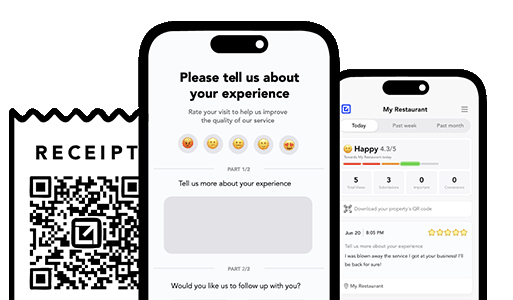
VisibleFeedback automatically texts or emails customers after every job.

  • Automated texts or emails post job
  • Catch issues before they go public
  • Reminders that drive repeat jobs
Send My First Follow Up
14 day trial, no credit card required

Recent follow Insights

8/26/2026
Retention

Septic Service Follow-Up: More Reviews, Fewer Callbacks, and Recurring Pumping Revenue

You pump the tank, check the baffles, and pull out, but the homeowner doesn't really judge the job until a few days later, when a drain gurgles or they spot a soft patch over the drainfield. Here's a simple septic service follow-up system that catches those worries privately, earns more 5-star reviews, and turns one pump-out into a customer who books you every three years.

8/23/2026
Reviews

Is It Legal to Text Customers for Reviews? SMS Compliance for Local Businesses

Yes, you can text customers for reviews, but only if you follow a few consent and opt-out rules. Here is the plain-English compliance guide for local service businesses.

8/22/2026
Retention

Chimney Sweep Follow-Up: More Reviews and Recurring Inspections

You sweep the flue, cap the top, and pull out clean, but the homeowner doesn't judge the job until the first cold night they light a fire and smell smoke in the living room. Here's a simple chimney sweep follow-up system that catches those complaints privately, earns more 5-star reviews, and turns one cleaning into an every-fall inspection.

8/21/2026
Retention

Property Management Follow-Up: More Reviews, Fewer Complaints, Higher Renewals

You closed the work order, the tech left, and the tenant seems fine, until a one-star review shows up on Google or Apartments.com two weeks later saying the leak is still there and nobody called back. Here's a simple property management follow-up system that catches those complaints privately, earns more reviews from tenants and owners, and drives the lease renewals that actually pay your bills.

8/18/2026
Retention

Gutter Cleaning Follow-Up: More Reviews and Recurring Work

You clear the gutters, flush the downspouts, and pull out, but the homeowner doesn't judge the job until the next hard rain, when they see water sheeting over one corner and boot prints on the porch roof. Here's a simple gutter cleaning follow-up system that catches those gripes privately, earns more 5-star reviews, and turns one cleaning into a twice-a-year route.

8/17/2026
follow-ups

Fence & Deck Contractor Follow-Up: More Reviews, Fewer Callbacks, More Repeat Work

A fence or deck is a big-ticket build the whole neighborhood sees, and most of its bad reviews come from normal wood movement a homeowner notices weeks later. Here's a simple fence and deck contractor follow-up system that catches those worries privately, earns more 5-star reviews, and books the restain and the next phase.

8/15/2026
Retention

Irrigation & Sprinkler Follow-Up: More Reviews, Fewer Callbacks, Repeat Seasonal Work

Sprinkler work is invisible when it runs and infuriating when a zone stops. Here's a simple irrigation follow-up system that catches problems privately before they hit Google, earns more 5-star reviews, and books every spring startup and fall blow-out on schedule.

8/14/2026
follow-ups

Flooring Installer Follow-Up: More Reviews, More Referrals, Fewer Callbacks

Flooring is a high-dollar, one-shot job where a squeak or a gap the homeowner notices a week later turns into a callback and a bad review. A simple flooring installer follow-up catches those small worries privately, turns happy homeowners into reviews, and keeps the referrals coming.

8/13/2026
follow-ups

Home Inspector Follow-Up: More Reviews, More Realtor Referrals, Fewer Disputes

Home inspectors live and die by two things: online reviews from buyers and steady referrals from agents. A simple home inspector follow-up system catches an anxious buyer privately before they leave a 1-star, turns happy clients into reviews, and keeps you top of mind with the realtors who feed your calendar.

8/12/2026
follow-ups

Remodeling Contractor Follow-Up: More Reviews, Fewer Punch-List Disputes

Remodeling jobs run for weeks, cost five figures, and live or die on the punch list. This is a simple remodeling contractor follow-up system that catches homeowner frustration privately, clears the punch list without disputes, and turns finished projects into 5-star reviews and referrals.

8/10/2026
follow-ups

Solar Installer Follow-Up: More Reviews, More Referrals, Fewer Complaints

Solar has the longest, most anxious gap between the sale and the payoff of almost any home service, and that silence is where the 1-star reviews come from. Here's a simple solar installer follow-up system that catches frustrated homeowners privately, earns more 5-star reviews, and turns happy customers into the referrals that actually grow a solar company.

8/9/2026
Retention

Chiropractor Follow-Up: More Reviews, Fewer Dropouts, More Rebookings

New patients decide whether they trust your practice in the hours after their first adjustment, when a little normal soreness can read like something went wrong. Here's a simple chiropractor follow-up system that catches worried patients privately, earns more 5-star reviews, and keeps people on their care plan instead of quietly dropping off.

8/8/2026
Retention

Locksmith Follow-Up: More Reviews, Fewer Price Disputes

Locksmithing is one of the hardest trades to build an honest reputation in, because the whole category is buried under fake listings, bait pricing, and scared customers who assume the worst. Here's a simple locksmith follow-up system that catches a price or workmanship gripe privately before it hits Google, earns more 5-star reviews, and turns one lockout into years of rekeys, referrals, and commercial accounts.

8/7/2026
Retention

Veterinary Clinic Follow-Up: More Reviews, Fewer No-Shows, More Rebookings

Pet owners decide whether they trust your clinic in the hours after they get home, and whether they come back in the weeks after that. Here's a simple veterinary clinic follow-up system that catches worried owners privately, earns more 5-star reviews, and cuts the no-shows and missed recalls that quietly drain your schedule.

8/6/2026
Retention

Junk Removal Follow-Up: More Reviews, Repeat Customers, and Fewer Complaints

Junk removal is won and lost on Google reviews and repeat callers, yet most crews load the truck, take the check, and drive off without ever hearing whether the customer was happy. Here's a simple junk removal follow-up system that catches complaints privately, earns more 5-star reviews, and turns one cleanout into a steady stream of repeat and referral work.

Show more insights
Issue Tracking for Small Service Teams: Statuses That Prevent Problems From Slipping
© Photo by Emanuel Ikwuegbu on Unsplash

Issue Tracking for Small Service Teams: Statuses That Prevent Problems From Slipping

TLDR: Small service teams don’t lose customers because they’re lazy. They lose customers because issues fall into cracks: a missed call-back, a “we’ll handle it tomorrow,” a tech who never gets the follow-up, a customer who feels ignored and goes straight to Google. The fix is a tiny issue-tracking system with clear statuses and daily habits. This article lays out a simple flow—New → Acknowledged → Contacted → Resolved—plus optional statuses for Escalated and Waiting. You’ll learn what each status means, who owns it, what actions are required, and how to run a 10-minute daily review so nothing slips. You’ll also see how VisibleFeedback helps by capturing issues from one-tap follow-ups, alerting the right person instantly, and keeping a clear timeline of what happened until the customer confirms it’s resolved.


Why Small Teams Need Statuses More Than Big Teams

Big teams can afford messy processes because there are enough people to brute-force problems.

Small teams can’t. When you’re running lean, every dropped issue costs you twice:

  • You lose the customer (or the repeat job)
  • You lose time doing damage control (calls, refunds, review responses)

A simple status flow prevents “I thought you handled it” situations. It turns issues into visible objects with:

  • a single owner
  • a clear next action
  • a defined “done”

No fancy ticketing system required. Just a consistent workflow.


The Minimal Status Flow That Works

Here’s the core flow:

New → Acknowledged → Contacted → Resolved

You can run this in:

  • a spreadsheet
  • a shared note
  • a Trello board
  • a basic CRM pipeline
  • VisibleFeedback (if you want it integrated with feedback capture)

The point isn’t the tool. The point is that everyone uses the same definitions.


Status Definitions (Use These Exact Meanings)

Keep the definitions strict. If you let people interpret statuses however they want, you’re back to chaos.

New

Meaning: The issue exists, but nobody has taken ownership yet.

Required action:

  • Assign an owner
  • Decide the next step (call, text, schedule, escalate)

Rule:

  • New should never sit longer than a short window (same day is the goal).

Acknowledged

Meaning: A real human has responded to the customer and confirmed someone is on it.

Required action:

  • Send an acknowledgement message
  • Set expectation for next contact (“I’ll call within an hour”)

Rule:

  • Acknowledged is not the same as Contacted. It’s just the “we heard you” step.

Contacted

Meaning: You’ve actually talked to the customer (or had a meaningful back-and-forth) and agreed on the plan.

Required action:

  • Capture what the customer wants
  • Set the resolution plan + timeline
  • Schedule the return visit or corrective action

Rule:

  • A one-line “we’ll look into it” doesn’t count as Contacted.

Resolved

Meaning: The fix has been completed and the customer has either confirmed it or you have a reasonable confirmation signal.

Required action:

  • Complete the fix (redo, refund/credit, re-treat, replace, explanation)
  • Send a closure check (“All set now?”)

Rule:

  • Resolved without confirmation is risky. If you can’t confirm, add a “Confirmed” checkbox or use the optional “Waiting” status below.

Two Optional Statuses That Make Life Easier

If you want slightly more precision without complexity, add these:

Escalated

Meaning: The issue needs a decision-maker (owner/manager) due to severity or risk.

Use when:

  • safety issue
  • property damage
  • repeat failure
  • customer mentions review/chargeback/legal threat
  • high-value account

Required action:

  • Name the decision-maker
  • Set a time for the decision (today, not “sometime”)

Waiting

Meaning: Progress is blocked by the customer or an external dependency.

Use when:

  • waiting for customer to reply
  • waiting for parts
  • waiting for landlord approval / property access
  • waiting on a vendor

Required action:

  • Set the next follow-up date/time (don’t leave it open-ended)

Ownership Rules (This Is Where Most Teams Fail)

Small teams drop issues because ownership is fuzzy.

Pick one of these ownership models and stick to it:

1) Dispatcher/office owns every issue end-to-end
2) “Last touch” owns it (whoever touched it last must move it forward)
3) Tech owns issues they created, office owns everything else

Model #1 is simplest for small teams. A single coordinator prevents bounce-around.

Whatever you pick, enforce this rule:

  • Every issue has exactly one owner at any time.

If two people “own it,” no one owns it.


The Daily 10-Minute Routine (So Nothing Slips)

You don’t need weekly meetings. You need a short daily review.

Do this once per day (morning is best): 1) Review every item in New
2) For each New item: assign owner + send acknowledgement
3) Review every item in Acknowledged
4) For each Acknowledged item: confirm contact is scheduled today
5) Review every item in Contacted
6) For each Contacted item: confirm next action and due time
7) Review every item in Waiting
8) For each Waiting item: confirm follow-up date exists
9) Close anything truly Resolved and send confirmation check if missing

This sounds basic because it is. Basic is what runs.


A Simple Tracking Template (Spreadsheet Columns)

If you’re doing this without software, use a sheet with these columns:

  • Date opened
  • Customer name
  • Phone/email
  • Job type (emergency / routine / install / recurring)
  • Issue category (communication / cleanliness / didn’t fix / price / scheduling / other)
  • Status (New / Acknowledged / Contacted / Resolved / Escalated / Waiting)
  • Owner
  • Next action
  • Due time
  • Last touch timestamp
  • Outcome (resolved / refund / redo / follow-up visit)
  • Customer confirmed? (Y/N)

The “Due time” and “Last touch” columns are what prevent slipping. Without those, statuses become labels, not a system.


Where This Workflow Connects to Follow-Ups

Your follow-up system is the input stream. Issue tracking is the control system.

A clean setup looks like this:

  • Follow-up message goes out (one-tap)
  • Any neutral/negative response creates an issue
  • That issue enters as New
  • It moves through the flow until resolved and confirmed

This is how you stop “feedback” from being just data. It becomes action.


How VisibleFeedback Helps

You can run this flow manually. The problem is consistency, speed, and visibility when you’re busy.

VisibleFeedback helps by:

  • capturing issues from one-tap follow-ups (no long forms)
  • creating structured categories so you don’t have to interpret messy text
  • alerting the right owner instantly when a low rating comes in
  • tracking the timeline from New to resolution
  • prompting confirmations so “resolved” actually means resolved

It turns the workflow into a default behavior, not a heroic effort.


Common Pitfalls (And the Fix)

  • Too many statuses: people stop using them
    Fix: keep it to 4 core statuses + 1–2 optional

  • “Acknowledged” becomes a dead-end
    Fix: require a due time for the next contact

  • Issues get marked Resolved without confirmation
    Fix: add a “Customer confirmed?” checkbox or use Waiting for confirmation

  • Nobody owns the issue
    Fix: enforce single-owner rule, always


Bottom Line

If you’re a small service team, a lightweight status flow is one of the highest leverage systems you can adopt.

New → Acknowledged → Contacted → Resolved

It’s simple on purpose. Run a 10-minute daily review, and you’ll stop losing customers to avoidable slippage. VisibleFeedback just makes the loop faster and more automatic—but the core is the status discipline.

VisibleFeedback running on iphones

Turn Jobs Into Repeat Work

Email clients after every job. Catch issues early, recover unhappy clients fast, and drive repeat work with smart reminders.

No card needed, cancel any time

Related articles

Best Pest Control Follow-Up Software: Features That Drive Retention

1/10/2026

Most “follow-up tools” send messages. The best pest control follow-up software drives retention by closing the loop: check-ins, recovery, confirmation, and renewals.

HVAC Issue Inbox for Dispatch Teams: Assignment & Escalation Rules

1/10/2026

A simple issue inbox model for HVAC dispatch: clear ownership, tight escalation triggers, and daily habits that keep response times low.

The Post-Job Follow-Up Loop: A Simple System That Works

1/10/2026

A one-tap follow-up loop that catches complaints privately, keeps customers happy, and drives repeat business and reviews.

People also ask

How can I prevent negative reviews from hurting my business? You can’t stop every unhappy customer from sharing feedback, but you can intercept it before it goes public. Tools like VisibleFeedback allow customers to scan a QR code and leave feedback privately. If the feedback is negative, you’re alerted instantly so you can resolve the issue before it turns into a 1-star review.
Why are customer reviews so important for local SEO? Reviews are one of the top local ranking factors on Google. Businesses with consistent positive reviews rank higher in search results and attract more customers. By using VisibleFeedback to capture happy customer moments and guide them to Google or Yelp, you build a steady flow of authentic reviews that improve both your reputation and your local SEO.
What’s the best way to collect customer feedback in 2025? Traditional methods like comment cards and long surveys don’t work anymore, customers want convenience. The easiest way to collect real-time feedback in 2025 is by using QR codes and mobile-friendly forms. VisibleFeedback makes this simple, helping you get instant insights while turning satisfied customers into 5-star reviewers.
Authored by Austin Spaeth

Austin Spaeth

Austin Spaeth is the founder of VisibleFeedback, a tool that helps service companies automate post-job follow-ups, catch issues early, and drive repeat work with smart reminders. With a background in software development and a focus on practical customer retention systems, Austin built VisibleFeedback to make it easy to email customers after every job, route problems to the right person, and keep relationships strong without awkward outreach. When he’s not building new features or writing playbooks for service businesses, he’s wrangling his six kids or sneaking in a beach day.

🚀 What's your goal? Get a plan ...

🚀 Start Here For Help

Whether you’re dealing with callbacks, unhappy customers, or low repeat work, we’ll help you tighten the follow up loop.

×

👋 Wait! Before You Go

Send your first follow up today! Catch issues early and drive repeat work.

No credit card required.